{
"schema_version": 2,
"id": "develop/tools/insight",
"title": "Redis Insight",
"url": "https://redis.io/docs/latest/develop/tools/insight/",
"summary": "Visualize and optimize Redis data, connect to RDI, and more.",
"aliases": [
"/develop/connect/insight",
"/ui/insight/",
"/connect/insight/"
],
"tags": [
"docs",
"develop",
"stack",
"oss",
"rs",
"rc",
"oss",
"kubernetes",
"clients"
],
"last_updated": "2026-09-29T11:55:24-07:00",
"children": [
{
"id": "develop/tools/insight/copilot-faq",
"summary": "",
"title": "Redis Copilot FAQ",
"url": "https://redis.io/docs/latest/develop/tools/insight/copilot-faq/"
},
{
"id": "develop/tools/insight/rdi-connector",
"summary": "Connect to RDI from Redis Insight, configure pipelines, and more.",
"title": "RDI in Redis Insight",
"url": "https://redis.io/docs/latest/develop/tools/insight/rdi-connector/"
},
{
"id": "develop/tools/insight/search-workspace",
"summary": "Create and manage search indexes, build and save queries, and explore your data in the Redis Insight Search workspace.",
"title": "Search workspace",
"url": "https://redis.io/docs/latest/develop/tools/insight/search-workspace/"
},
{
"id": "develop/tools/insight/insight-stream-consumer",
"summary": "Learn how to manage streams and consumer groups in Redis Insight",
"title": "Manage streams and consumer groups in Redis Insight",
"url": "https://redis.io/docs/latest/develop/tools/insight/insight-stream-consumer/"
},
{
"id": "develop/tools/insight/debugging",
"summary": "Redis Insight debugging information",
"title": "Redis Insight debugging information",
"url": "https://redis.io/docs/latest/develop/tools/insight/debugging/"
},
{
"id": "develop/tools/insight/release-notes",
"summary": "",
"title": "Redis Insight release notes",
"url": "https://redis.io/docs/latest/develop/tools/insight/release-notes/"
}
],
"page_type": "content",
"content_hash": "256dfa1f89fa450cfca0233f0515c1f9fbffd2fd00f58e2089fac48e017a6b5c",
"sections": [
{
"id": "overview-1",
"title": "Overview",
"role": "overview",
"text": "[](https://discord.gg/QUkjSsk)\n[](https://github.com/redisinsight/redisinsight/)\n\nRedis Insight is a powerful tool for visualizing and optimizing data in Redis, making real-time application development easier and more fun than ever before. Redis Insight lets you do both GUI- and CLI-based interactions in a fully-featured desktop GUI client."
},
{
"id": "installation-and-release-notes",
"title": "Installation and release notes",
"role": "setup",
"text": "\n \n \n \n
"
},
{
"id": "overview",
"title": "Overview",
"role": "overview",
"text": ""
},
{
"id": "connection-management",
"title": "Connection management",
"role": "content",
"text": "* Automatically discover and add your local Redis databases (that use standalone connection type and do not require authentication).\n* Discover your databases in Redis Software Cluster and databases with Flexible plans in Redis Cloud.\n* Use a form to enter your connection details and add any Redis database running anywhere (including Redis Open Source cluster or sentinel).\n* Connect to a Redis Data Integration (RDI) management plane, create, test, and deploy RDI pipelines, and view RDI statistics.\n\n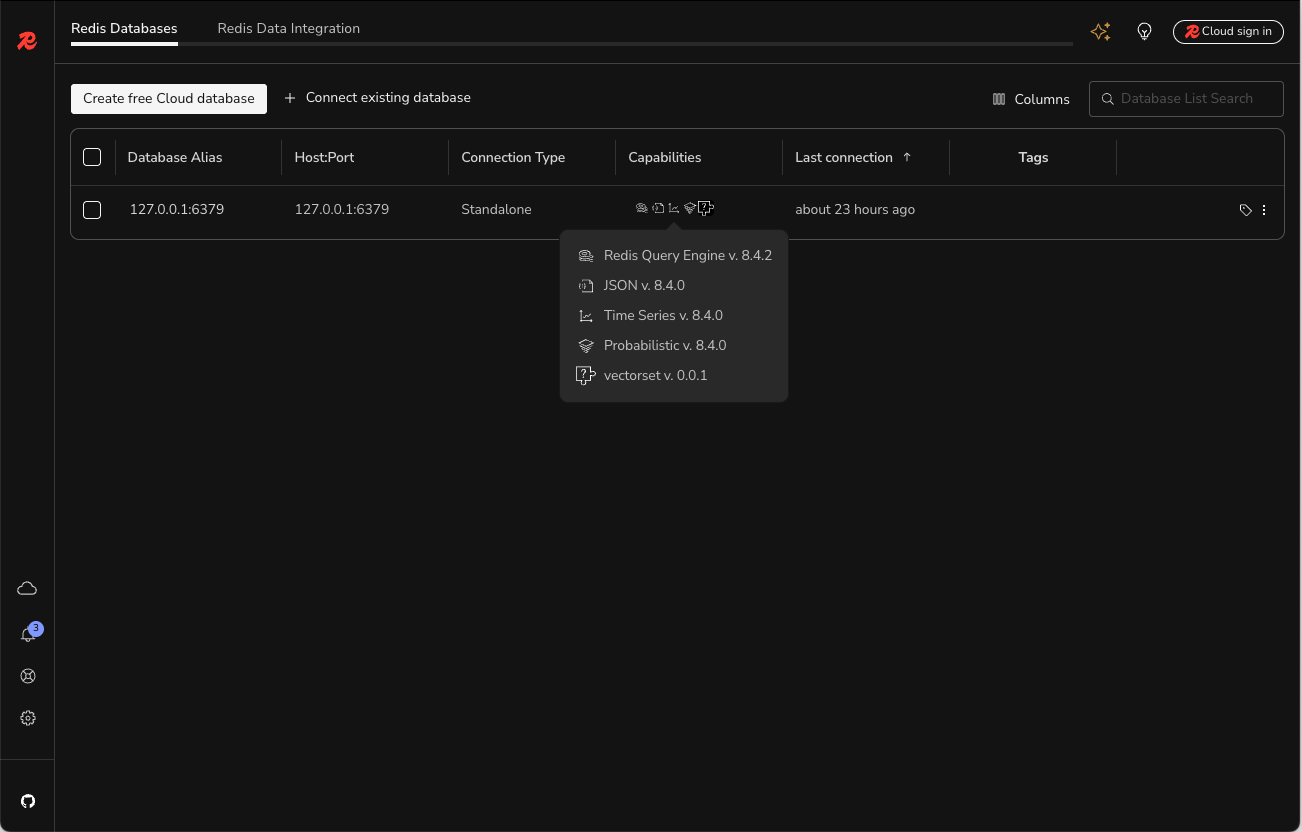\n\n> [!NOTE]\n> When you add a Redis database for a particular user using the `username` and `password` fields, that user must be able to run the `INFO` command. See the [access control list (ACL) documentation](https://redis.io/docs/latest/operate/oss_and_stack/management/security/acl) for more information."
},
{
"id": "connect-to-azure-managed-redis-with-ease",
"title": "Connect to Azure Managed Redis with ease",
"role": "content",
"text": "Automatically discover databases across subscriptions and connect using Microsoft Entra ID (OAuth) with passwordless authentication and background token refresh. Redis Insight supports both Azure Managed Redis and Azure Cache for Redis tiers, with:\n\n- Auto-discovery of subscriptions and databases\n- One-click import and connection\n- Multi-account support for switching between Azure accounts\n- Improved, user-friendly error handling\n\n> [!NOTE]\n> This feature requires Azure-side configuration. Please coordinate with your Azure administrator and follow [the setup guide](https://github.com/redis/RedisInsight/blob/main/docs/azure-setup.md) to configure the necessary permissions."
},
{
"id": "redis-copilot",
"title": "Redis Copilot",
"role": "content",
"text": "Redis Copilot is an AI-powered developer assistant that helps you learn about Redis, explore your Redis data, and build search queries in a conversational manner. It is available in Redis Insight as well as within the Redis public documentation.\n\nCurrently, Redis Copilot provides two primary features: a general chatbot and a context-aware data chatbot.\n\n**General chatbot**: the knowledge-based chatbot serves as an interactive and dynamic documentation interface to simplify the learning process. You can ask specific questions about Redis commands, concepts, and products, and get responses on the fly. The general chatbot is also available in our public docs.\n\n**My data chatbot**: the context-aware chatbot available in Redis Insight lets you construct search queries using everyday language rather than requiring specific programming syntax. This feature lets you query and explore data easily and interactively without extensive technical knowledge.\n\nBefore you can use Redis Copilot, you must first sign in and accept the terms of use. Click on the Redis Copilot icon in the top right corner of the Redis Insight window to sign in and accept the terms of use.\n\n\n\n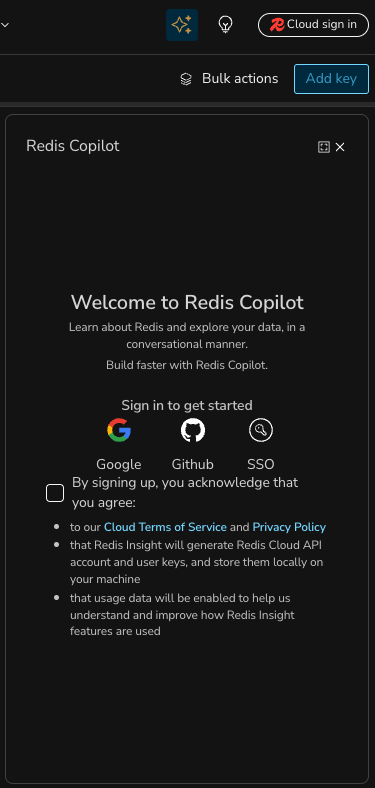\n\nHere's an example of using Redis Copilot to search data using a simple, natural language prompt.\n\n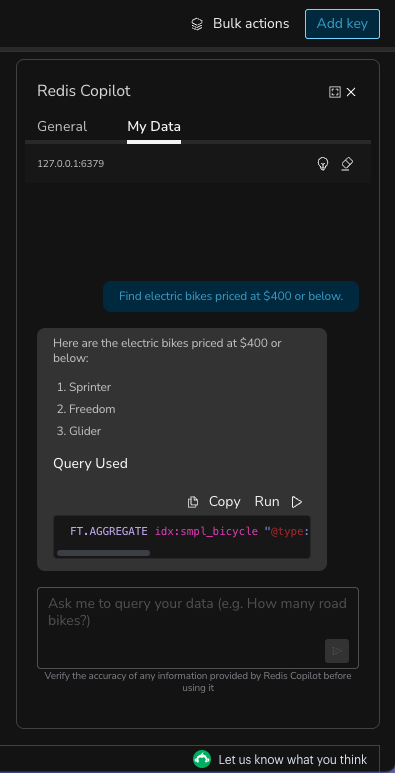\n\nSee the [Redis Insight Copilot FAQ](https://redis.io/docs/latest/develop/tools/insight/copilot-faq) for more information."
},
{
"id": "rdi-in-redis-insight",
"title": "RDI in Redis Insight",
"role": "content",
"text": "Redis Insight includes Redis Data Integration (RDI) connectivity, which allows you to connect to an RDI management plane, and create, test, and deploy RDI pipelines. Read more about this feature [here](https://redis.io/docs/latest/develop/tools/insight/rdi-connector)."
},
{
"id": "browser",
"title": "Browser",
"role": "content",
"text": "Browse, filter and visualize your key-value Redis data structures.\n* [CRUD](https://en.wikipedia.org/wiki/Create,_read,_update_and_delete) support for lists, hashes, strings, sets, sorted sets, streams, arrays, and vector sets.\n* CRUD support for [JSON](https://redis.io/docs/latest/develop/data-types/json).\n* Group keys according to their namespaces.\n\n* View, validate, and manage your key values in a human-readable format using formatters that prettify and highlight data in different formats (for example, Unicode, JSON, MessagePack, HEX, and ASCII) in the Browser tool.\n\n 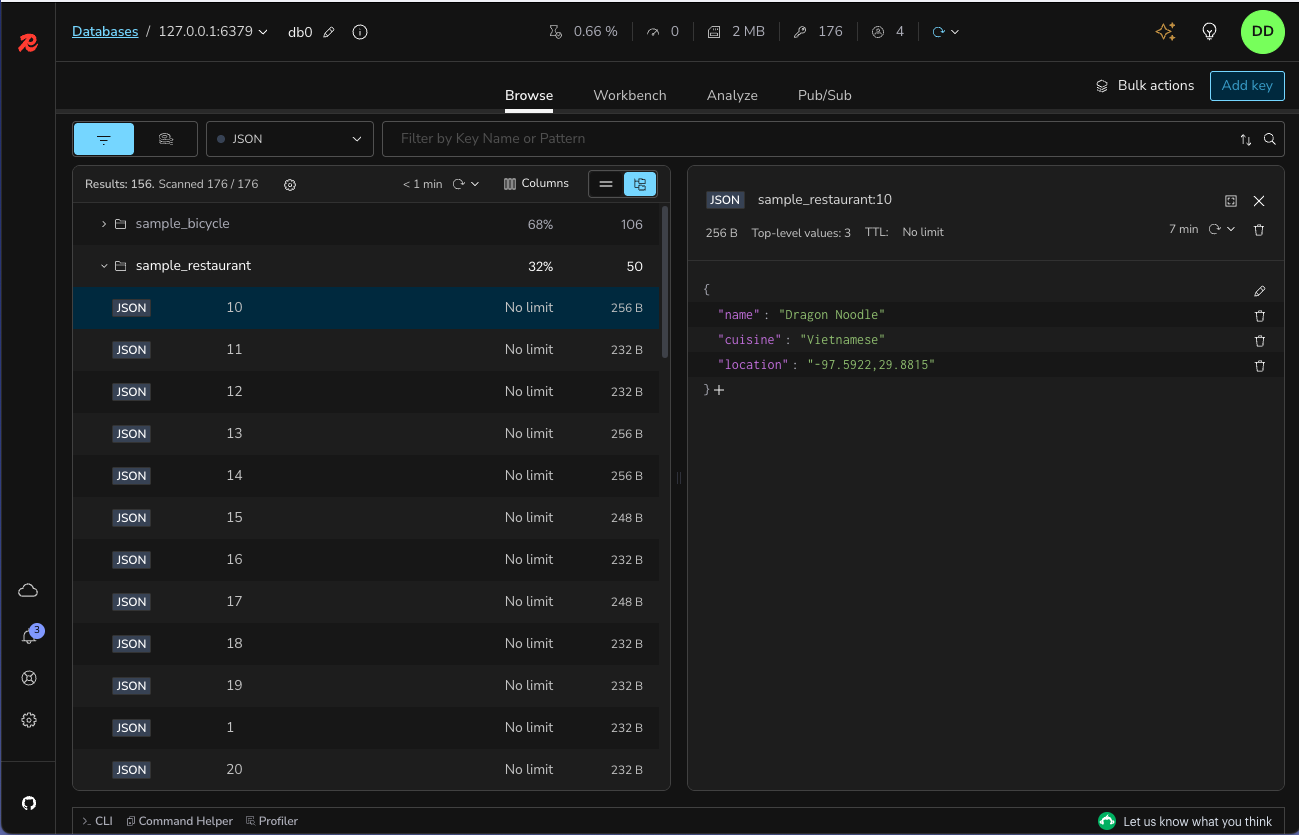"
},
{
"id": "profiler",
"title": "Profiler",
"role": "content",
"text": "Analyze every command sent to Redis in real time. To use the profiler, click **Profiler** at the bottom left of the screen. It should reveal the profiler window, and there you can start the profiler by clicking on **Start Profiler**.\n\n"
},
{
"id": "cli",
"title": "CLI",
"role": "content",
"text": "The CLI is accessible at any time within the application. To use the CLI, click **>_ CLI** at the bottom left of the screen. It should reveal the CLI window, and there you can start typing Redis [commands](/commands).\n\nThe CLI includes the following features:\n\n* Employs integrated help to deliver intuitive assistance.\n* Use together with a convenient command helper that lets you search and read on Redis commands.\n\n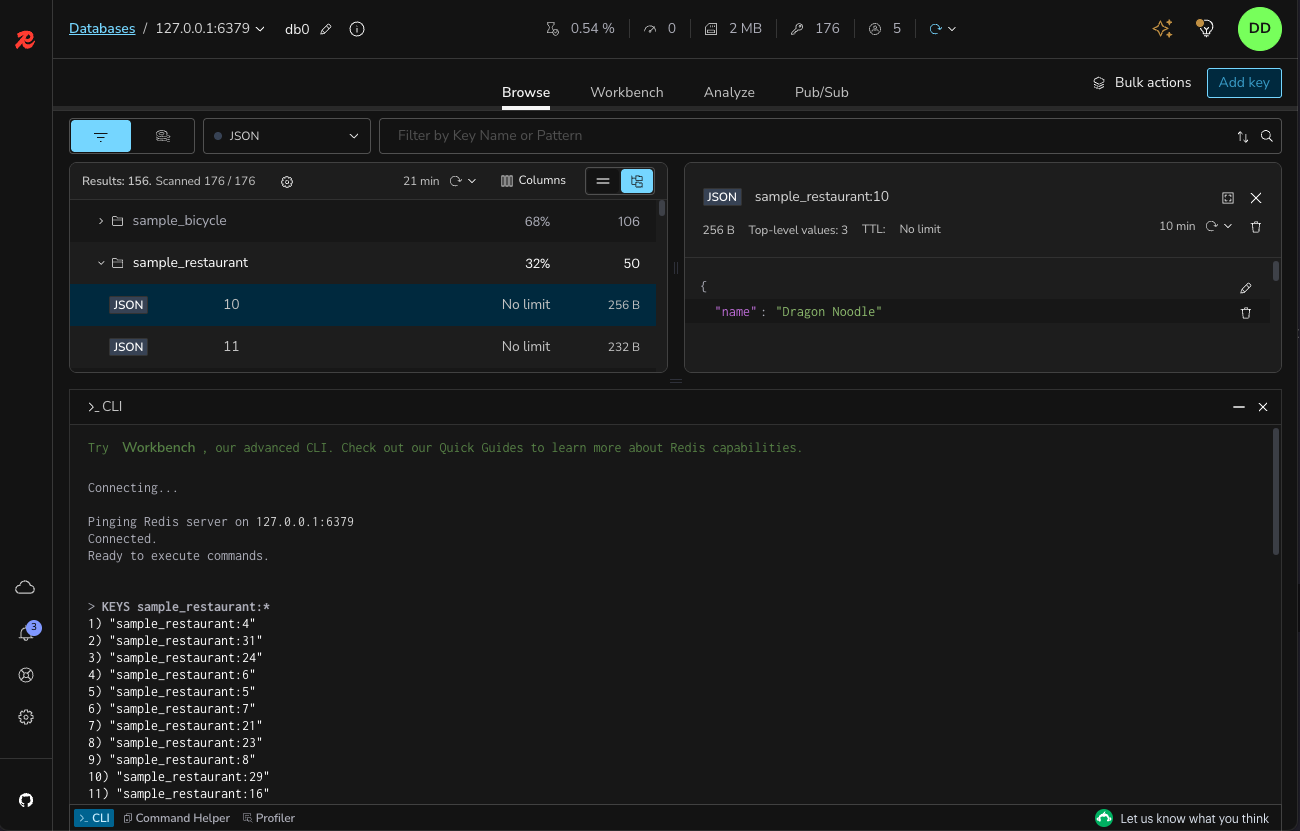"
},
{
"id": "workbench",
"title": "Workbench",
"role": "content",
"text": "Workbench is an advanced command line interface with intelligent command auto-complete and complex data visualization support.\n\n* Built-in guides: you can conveniently discover Redis and Redis Open Source features using the built-in guides.\n* Command auto-complete support for all features in Redis and Redis Open Source.\n* Advanced, schema-aware auto-complete for Redis Search, which provides for faster query building with context-sensitive suggestions that recognize indexes, schemas, and fields based on your current query. Start typing any Redis Search command in to try this feature. See below for an example of an in-progress `FT.SEARCH` command.\n\n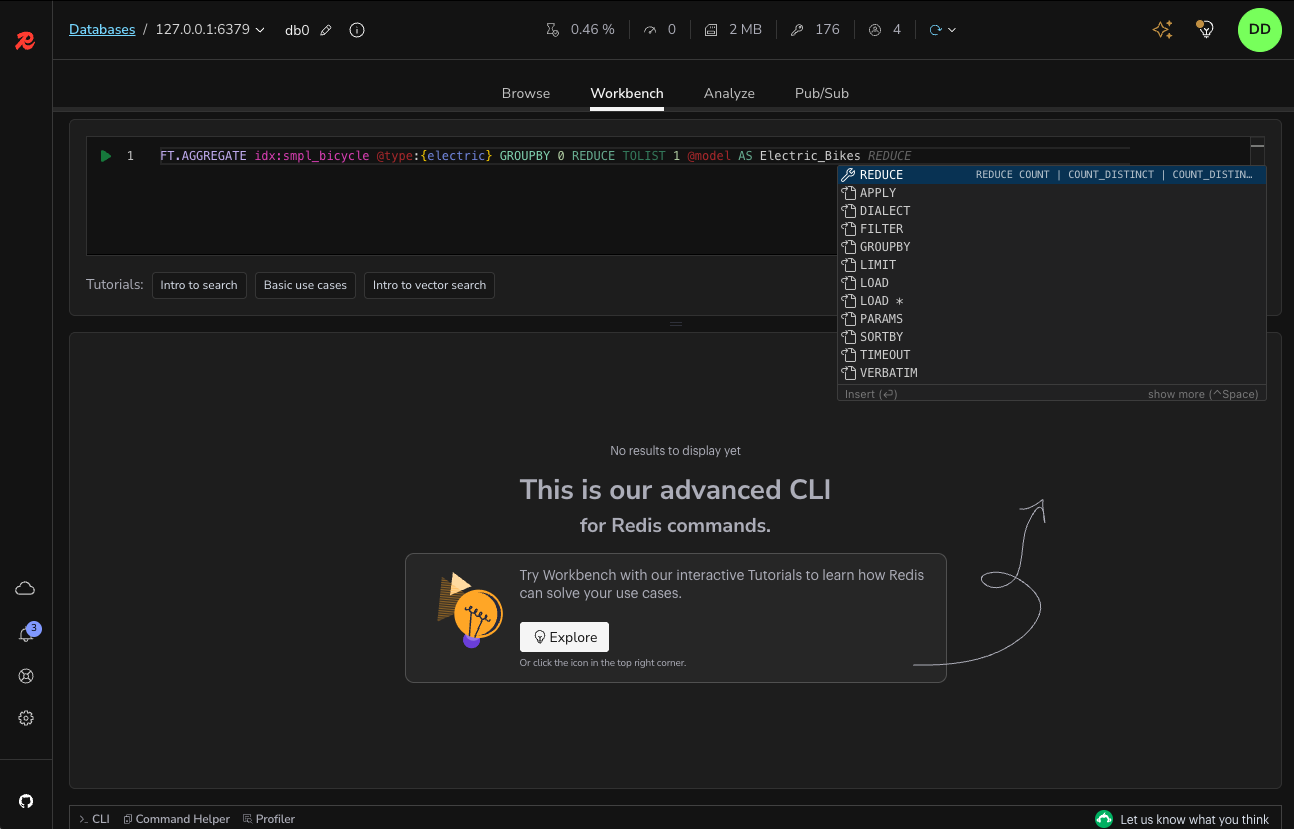\n\nWorkbench also includes:\n\n* Visualizations of your indexes, queries, and aggregations.\n* Visualizations of your [time series](https://redis.io/docs/latest/develop/data-types/timeseries) data.\n\n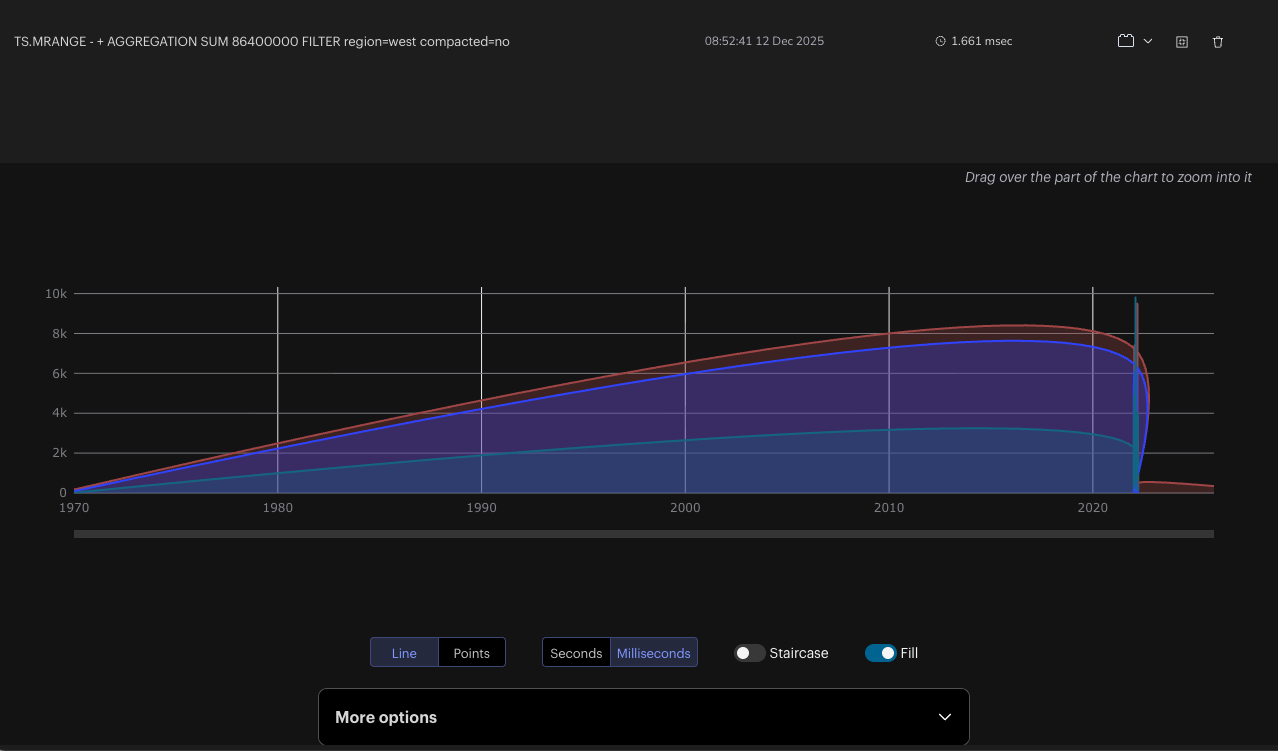"
},
{
"id": "tools",
"title": "Tools",
"role": "content",
"text": ""
},
{
"id": "database-analysis",
"title": "Database analysis",
"role": "content",
"text": "Use the database analysis tool to optimize the performance and memory usage of your Redis database. Check data type distribution and memory allocation and review the summary of key expiration time and memory to be freed over time. Inspect the top keys and namespaces sorted by consumed memory or key length and count of keys, respectively. Capture and track the changes in your database by viewing historical analysis reports. Next figure shows a sample database analysis report.\n\n> [!NOTE]\n> The database analysis tool will only analyze up to 10,000 keys. If more than 10,000 keys are present, the tool will attempt to use extrapolation in its analysis.\n\n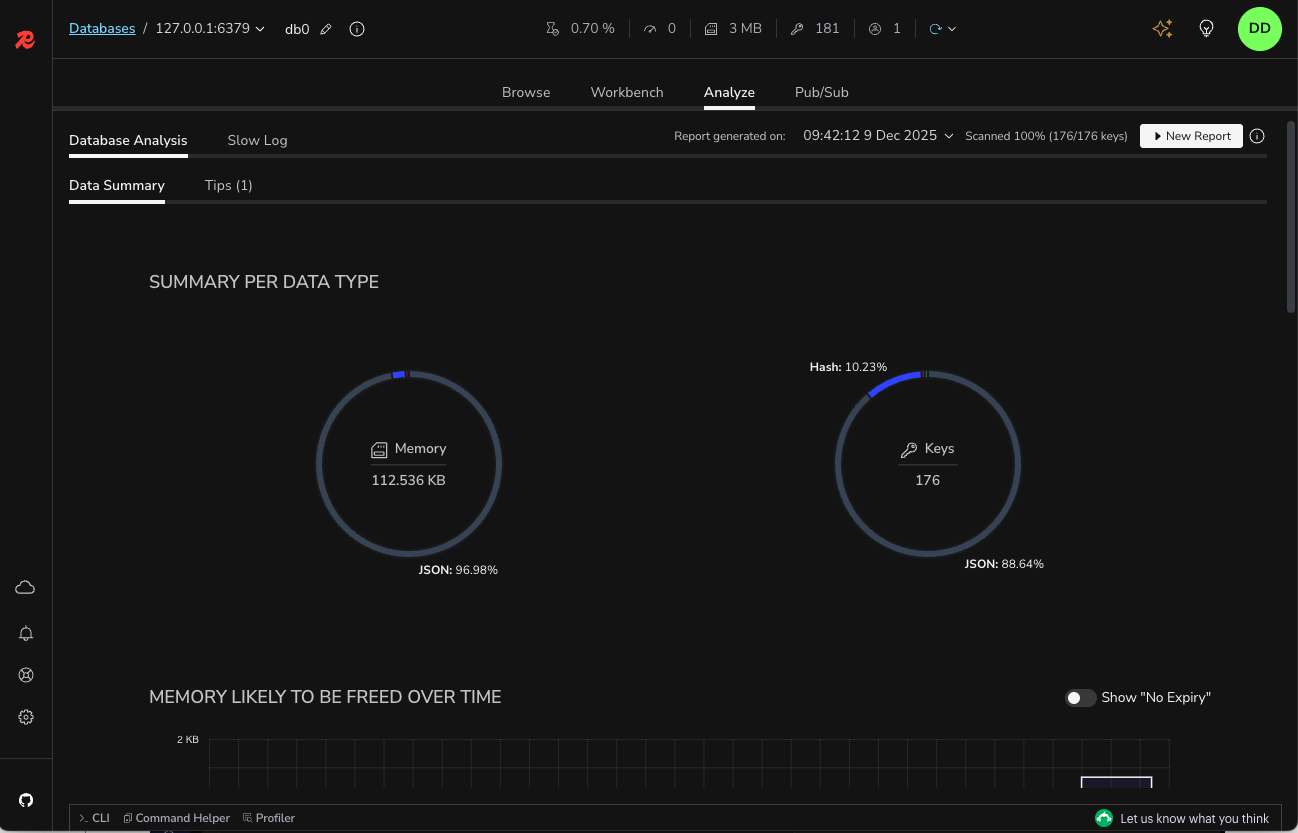"
},
{
"id": "redis-streams-support",
"title": "Redis Streams support",
"role": "content",
"text": "Create and manage streams by adding, removing, and filtering entries per timestamp. To see and work with new entries, enable and customize the automatic refresh rate.\n\nView and manage the list of consumer groups. See existing consumers in a given consumer name as well as the last messages delivered to them. Inspect the list of pending messages, explicitly acknowledge the processed items, or claim unprocessed messages via Redis Insight.\n\n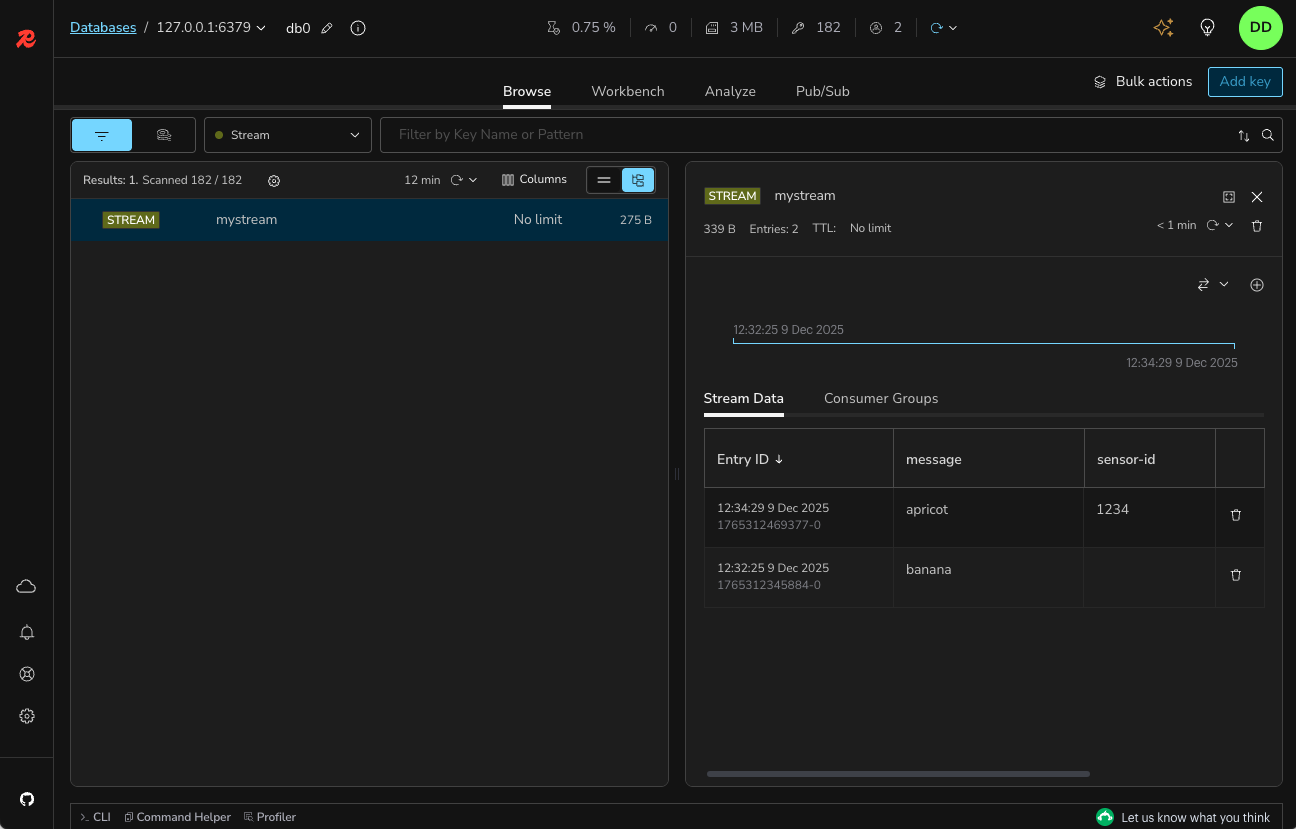"
},
{
"id": "search-workspace",
"title": "Search workspace",
"role": "content",
"text": "The dedicated **Search** workspace lets you work with [Redis Search](https://redis.io/docs/latest/develop/ai/search-and-query) from a single page: browse the search indexes in your database, create indexes from sample or existing data, build and run queries with a schema-aware editor that includes Profile and Explain actions, and save queries to a reusable Query Library. You can also move between the Browser and Search workspaces to make data searchable and view the indexes associated with a key.\n\nRead more about this feature [here](https://redis.io/docs/latest/develop/tools/insight/search-workspace).\n\n"
},
{
"id": "bulk-actions",
"title": "Bulk actions",
"role": "content",
"text": "Easily and quickly delete multiple keys of the same type and/or with the same key name pattern in bulk. To do so, in the List or Tree view, set filters per key type or key names and open the Bulk Actions section. The section displays a summary of all the keys with the expected number of keys that will be deleted based on the set filters.\n\nWhen the bulk deletion is completed, Redis Insight displays the results of this operation with the number of keys processed and the time taken to delete the keys in bulk.\nUse bulk deletion to optimize the usage of your database based on the results from the Redis database analysis.\n\n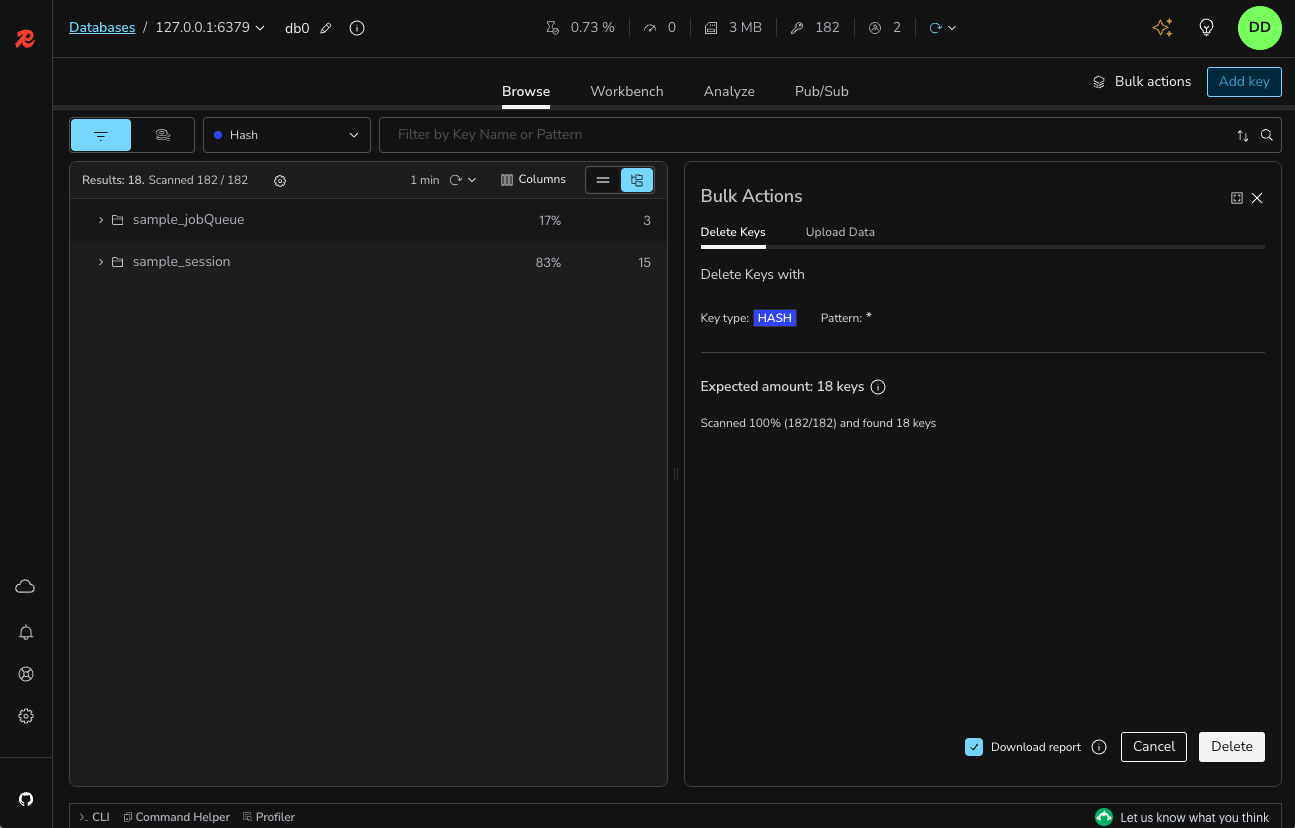"
},
{
"id": "slow-log",
"title": "Slow Log",
"role": "content",
"text": "The Slow Log tool displays the list of logs captured by the SLOWLOG command to analyze all commands that exceed a specified runtime, which helps with troubleshooting performance issues. Specify both the runtime and the maximum length of Slowlog (which are server configurations) to configure the list of commands logged and set the auto-refresh interval to automatically update the list of commands displayed.\n\n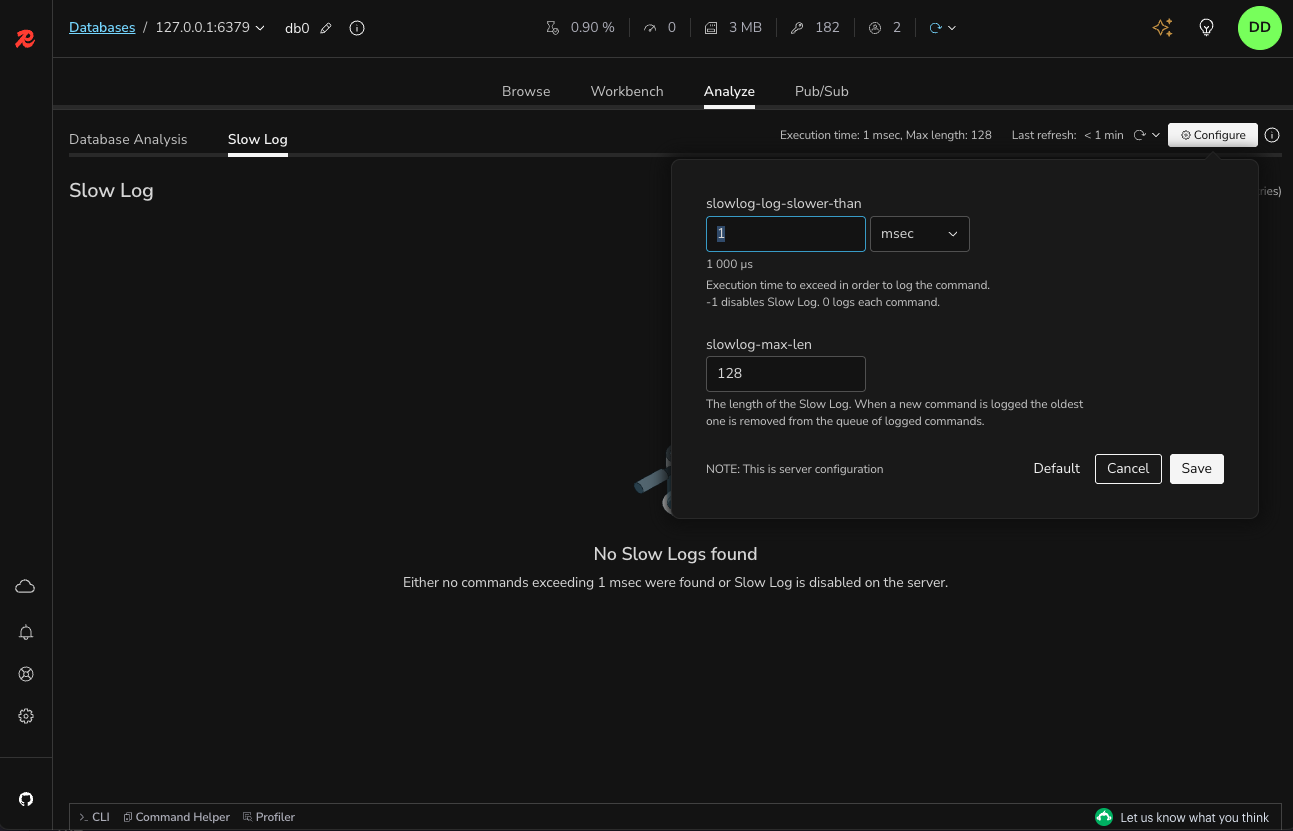"
},
{
"id": "plugins",
"title": "Plugins",
"role": "content",
"text": "With Redis Insight you can now also extend the core functionality by building your own data visualizations. See our [plugin documentation](https://github.com/Redis-Insight/Redis-Insight/wiki/Plugin-Documentation) for more information."
},
{
"id": "telemetry",
"title": "Telemetry",
"role": "content",
"text": "Redis Insight includes an opt-in telemetry system. This help us improve the developer experience of the app. We value your privacy; all collected data is anonymized."
},
{
"id": "log-files",
"title": "Log files",
"role": "content",
"text": "You can review the Redis Insight log files (files with a `.log` extension) to get detailed information about system issues.\nThese are the locations on supported platforms:\n\n- **Docker**: In the `/data/logs` directory *inside the container*.\n- **Mac**: In the `/Users//.redis-insight` directory.\n- **Windows**: In the `C:\\Users\\\\.redis-insight` directory.\n- **Linux**: In the `/home//.redis-insight` directory.\n\n> [!NOTE]\n> You can install Redis Insight on operating systems that are not officially supported, but it may not behave as expected."
},
{
"id": "redis-insight-api-only-for-docker",
"title": "Redis Insight API (only for Docker)",
"role": "content",
"text": "If you are running Redis Insight from [Docker](https://redis.io/docs/latest/operate/redisinsight/install/install-on-docker),\nyou can access the API from `http://localhost:5540/api/docs`."
},
{
"id": "feedback",
"title": "Feedback",
"role": "content",
"text": "To provide your feedback, [open a ticket in our Redis Insight repository](https://github.com/Redis-Insight/Redis-Insight/issues/new)."
},
{
"id": "license",
"title": "License",
"role": "content",
"text": "Redis Insight is licensed under [SSPL](https://github.com/Redis-Insight/Redis-Insight/blob/main/LICENSE) license."
}
],
"examples": []
}