# Store JSON in Active-Active databases
```json metadata
{
"schema_version": 2,
"title": "Store JSON in Active-Active databases",
"description": "JSON support and conflict resolution rules for Active-Active databases.",
"categories": ["docs","operate","stack"],
"tableOfContents": {"sections":[{"id":"create-an-active-active-json-database","title":"Create an Active-Active JSON database"}]}
,
"codeExamples": []
}
```
RedisJSON v2.2 adds support for JSON in [Active-Active Redis Software databases](https://redis.io/docs/latest/operate/rs/databases/active-active).
The design is based on [A Conflict-Free Replicated JSON Datatype](https://arxiv.org/abs/1608.03960) by Kleppmann and Beresford, but the implementation includes some changes. Several [conflict resolution rule](#conflict-resolution-rules) examples were adapted from this paper as well.
## Create an Active-Active JSON database
To use JSON in an Active-Active database, you must enable JSON during database creation.
Active-Active Redis Cloud databases add JSON by default. See [Create an Active-Active database](https://redis.io/docs/latest/operate/rc/databases/active-active/create-active-active-database#select-capabilities) in the Redis Cloud documentation for details.
In Redis Software, Active-Active databases created with or upgraded to Redis version 8 or later automatically enable JSON. For earlier Redis versions, you can enable JSON during database creation:
1. See [Create an Active-Active geo-replicated database](https://redis.io/docs/latest/operate/rs/databases/active-active/create) in the Redis Software documentation for prerequisites and detailed steps.
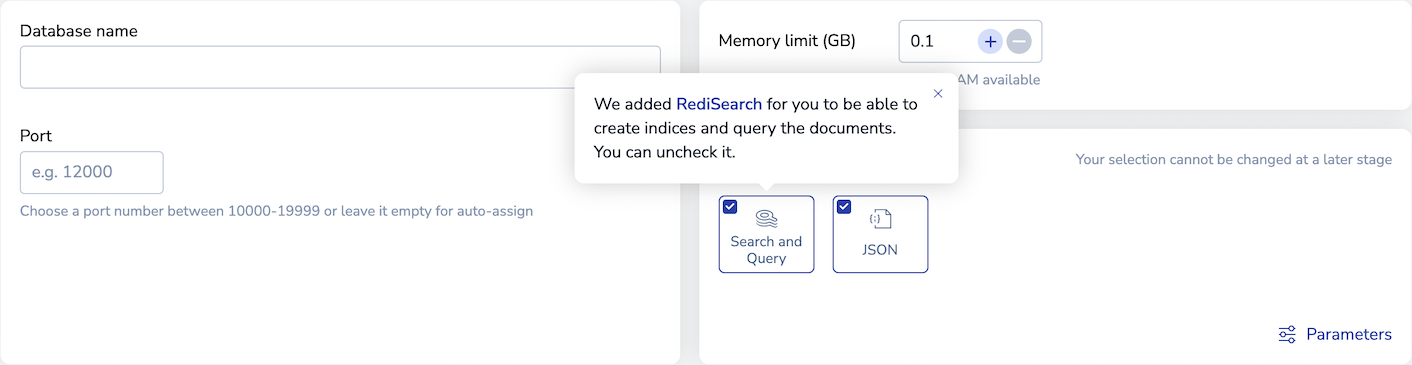
1. In the **Capabilities** section of the **Create Active-Active database** screen, select **JSON**:
> [!NOTE]
> When you select **JSON**, **Search and Query** is also selected by default to allow you to index and query JSON documents. If you do not want to use these additional features, you can clear the **Search and Query** check box.
>
1. Configure additional database settings.
1. Select **Create**.
## Command differences
Some JSON commands work differently for Active-Active databases.
### `JSON.CLEAR`
[`JSON.CLEAR`](https://redis.io/docs/latest/commands/json.clear) resets JSON arrays and objects. It supports concurrent updates to JSON documents from different instances in an Active-Active database and allows the results to be merged.
## Conflict resolution rules
With Active-Active databases, it's possible for two different instances to try to run write operations on the same data at the same time. If this happens, conflicts can arise when the replicas attempt to sync these changes with each other. Conflict resolution rules determine how the database handles conflicting operations.
There are two types of conflict resolution:
1. Merge:
- The operations are associative.
- Merges the results of both operations.
1. Win over:
- The operations are not associative.
- One operation wins the conflict and sets the value.
- Ignores the losing operation.
The following conflict resolution rules show how Active-Active databases resolve conflicts for various JSON commands.
### Assign different types to a key
**Conflict**
Two instances concurrently assign values of different types to the same key within a JSON document.
For example:
Instance 1 assigns an object to a key within a JSON document.
Instance 2 assigns an array to the same key.
**Resolution type**
Win over
**Resolution rule**
The instance with the smaller ID wins, so the key becomes an object in the given example.
**Example**
| Time | Description | Instance 1 | Instance 2 |
| :---: | :--- | :--- | :--- |
| t1 | Set the same key to an object or an array | JSON.SET doc $.a '{}' | JSON.SET doc $.a '[]' |
| t2 | Add data to the object and array | JSON.SET doc $.a.x '"y"'
Result:
{"a": {"x": "y"}} | JSON.SET doc $.a '["z"]'
Result:
{"a": ["z"]} |
| t3 | Active-Active synchronization | – Sync – | – Sync – |
| t4 | Instance 1 wins | JSON.GET doc $
Result:
{"a": {"x": "y"}} | JSON.GET doc $
Result:
{"a": {"x": "y"}} |
### Create versus create
**Conflict**
Two instances concurrently use `JSON.SET` to assign a new JSON document to the same key.
**Resolution type**
Win over
**Resolution rule**
The instance with the smaller ID wins.
**Example**
| Time | Description | Instance 1 | Instance 2 |
| :---: | :--- | :--- | :--- |
| t1 | Create a new JSON document | JSON.SET doc $ '{"field": "a"}' | JSON.SET doc $ '{"field": "b"}' |
| t2 | Active-Active synchronization | – Sync – | – Sync – |
| t3 | Instance 1 wins | JSON.GET doc $
Result:
{"field": "a"} | JSON.GET doc $
Result:
{"field": "a"} |
### Create versus update
**Conflict**
Instance 1 creates a new document and assigns it to an existing key with `JSON.SET`.
Instance 2 updates the existing content of the same key with `JSON.SET`.
**Resolution type**
Win over
**Resolution rule**
The operation that creates a new document wins.
**Example**
| Time | Description | Instance 1 | Instance 2 |
| :---: | :--- | :--- | :--- |
| t1 | The document exists on both instances | JSON.GET doc $
Result:
{"field1": "value1"} | JSON.GET doc $
Result:
{"field1": "value1"} |
| t2 | Instance 1 creates a new document; instance 2 updates the existing document | JSON.SET doc $ '{"field2": "value2"}' | JSON.SET doc $.field1 '[1, 2, 3]' |
| t3 | Active-Active synchronization | – Sync – | – Sync – |
| t4 | Instance 1 wins | JSON.GET doc .
Result:
{"field2": "value2"} | JSON.GET doc .
Result:
{"field2": "value2"} |
### Delete versus create
**Conflict**
Instance 1 deletes a JSON document with `JSON.DEL`.
Instance 2 uses `JSON.SET` to create a new JSON document and assign it to the key deleted by instance 1.
**Resolution type**
Win over
**Resolution rule**
Document creation wins over deletion.
**Example**
| Time | Description | Instance 1 | Instance 2 |
| :---: | :--- | :--- | :--- |
| t1 | The document exists on both instances | JSON.GET doc $
Result:
{"field1": "value1"} | JSON.GET doc $
Result:
{"field1": "value1"} |
| t2 | Instance 1 deletes the document; instance 2 creates a new document | JSON.DEL doc | JSON.SET doc $ '{"field1": "value2"}' |
| t3 | Active-Active synchronization | – Sync – | – Sync – |
| t4 | Instance 2 wins | JSON.GET doc $
Result:
{"field1": "value2"} | JSON.GET doc $
Result:
{"field1": "value2"} |
### Delete versus update
**Conflict**
Instance 1 deletes a JSON document with `JSON.DEL`.
Instance 2 updates the content of the same document with `JSON.SET`.
**Resolution type**
Win over
**Resolution rule**
Document deletion wins over updates.
**Example**
| Time | Description | Instance 1 | Instance 2 |
| :---: | :--- | :--- | :--- |
| t1 | The document exists on both instances | JSON.GET doc $
Result:
{"field1": "value1"} | JSON.GET doc $
Result:
{"field1": "value1"} |
| t2 | Instance 1 deletes the document; instance 2 updates it | JSON.DEL doc | JSON.SET doc $.field1 '[1, 2, 3]' |
| t3 | Active-Active synchronization | – Sync – | – Sync – |
| t4 | Instance 1 wins | JSON.GET doc $
Result:
(nil) | JSON.GET doc $
Result:
(nil) |
### Update versus update
**Conflict**
Instance 1 updates a field inside a JSON document with `JSON.SET`.
Instance 2 updates the same field with a different value.
**Resolution type**
Win over
**Resolution rule**
The instance with the smallest ID wins.
**Example**
| Time | Description | Instance 1 | Instance 2 |
| :---: | :--- | :--- | :--- |
| t1 | The document exists on both instances | JSON.GET doc $
Result:
{"field": "a"} | JSON.GET doc $
Result:
{"field": "a"} |
| t2 | Update the same field with different data | JSON.SET doc $.field "b" | JSON.SET doc $.field "c" |
| t3 | Active-Active synchronization | – Sync – | – Sync – |
| t4 | Instance 1 wins | JSON.GET doc $
Result:
{"field": "b"} | JSON.GET doc $
Result:
{"field": "b"} |
### Update versus clear
The version of RedisJSON prior to v2.2 has two different ways to reset the content of a JSON object:
- Assign a new empty JSON object:
```sh
JSON.SET doc $.colors '{}'
```
If you use this method, it cannot be merged with a concurrent update.
- For each key, remove it with `JSON.DEL`:
```sh
JSON.DEL doc $.colors.blue
```
With this method, it can merge the reset with concurrent updates.
As of RedisJSON v2.2, you can use the `JSON.CLEAR` command to reset the JSON document without removing each key manually. This method also lets concurrent updates be merged.
#### Assign an empty object
**Conflict**
Instance 1 adds "red" to the existing "colors" object with `JSON.SET`.
Instance 2 assigns a new empty object for "colors".
**Resolution type**
Win over
**Resolution rule**
Document creation wins over the update, so the result will be an empty object.
**Example**
| Time | Description | Instance 1 | Instance 2 |
| :---: | :--- | :--- | :--- |
| t1 | The document exists on both instances | JSON.GET doc $
Result:
{"colors": {"blue": "#0000ff"}} | JSON.GET doc $
Result:
{"colors": {"blue": "#0000ff"}} |
| t2 | Instance 1 adds a new color; instance 2 resets colors to an empty object | JSON.SET doc $.colors.red ‘#ff0000’ | JSON.SET doc $.colors ‘{}’ |
| t3 | Instance 2 adds a new color | | JSON.SET doc $.colors.green ‘#00ff00’ |
| t4 | | JSON.GET doc $
Result:
{"colors": {"blue": "#0000ff", "red": "#ff0000"}} | JSON.GET doc $
Result:
{"colors": {"green": "#00ff00"}} |
| t5 | Active-Active synchronization | – Sync – | – Sync – |
| t6 | Instance 2 wins | JSON.GET doc $
Result:
{"colors": {"green": "#00ff00"}} | JSON.GET doc $
Result:
{"colors": {"green": "#00ff00"}} |
#### Use `JSON.CLEAR`
**Conflict**
Instance 1 adds "red" to the existing "colors" object with `JSON.SET`.
Instance 2 clears the "colors" object with `JSON.CLEAR` and adds "green" to "colors".
**Resolution type**
Merge
**Resolution rule**
Merges the results of all operations.
**Example**
| Time | Description | Instance 1 | Instance 2 |
| :---: | :--- | :--- | :--- |
| t1 | The document exists on both instances | JSON.GET doc $
Result:
{"colors": {"blue": "#0000ff"}} | JSON.GET doc $
Result:
{"colors": {"blue": "#0000ff"}} |
| t2 | Instance 1 adds a new color; instance 2 resets the colors | JSON.SET doc $.colors.red ‘#ff0000’ | JSON.CLEAR doc $.colors |
| t3 | | JSON.GET doc $
Result:
{"colors": {"blue": "#0000ff", "red": "#ff0000"}} | JSON.GET doc $
Result:
{"colors": {}} |
| t4 | Instance 2 adds a new color | | JSON.SET doc $.colors.green ‘#00ff00’ |
| t5 | | | JSON.GET doc $
Result:
{"colors": {"green": "#00ff00"}} |
| t6 | Active-Active synchronization | – Sync – | – Sync – |
| t7 | Merges the results of both instances | JSON.GET doc $
Result:
{"colors": {"red": "#ff0000", "green": "#00ff00"}} | JSON.GET doc $
Result:
{"colors": {"red": "#ff0000", "green": "#00ff00"}} |
### Update versus update array
**Conflict**
Two instances update the same existing array with different content.
**Resolution type**
Merge
**Resolution rule**
Merges the results of all operations on the array. Preserves the original element order from each instance.
**Example**
| Time | Description | Instance 1 | Instance 2 |
| :---: | :--- | :--- | :--- |
| t1 | The document exists on both instances | JSON.GET doc $
Result:
'["a", "b", "c"]' | JSON.GET doc $
Result:
'["a", "b", "c"]' |
| t2 | Instance 1 removes an array element; instance 2 adds one | JSON.ARRPOP doc $ 1
Result:
["a", "c"] | JSON.ARRINSERT doc $ 0 ‘"y"’
Result:
["y", "a", "b", "c"] |
| t3 | Both instances add another element to the array | JSON.ARRINSERT doc $ 1 ‘"x"’
Result:
["a", "x", "c"] | JSON.ARRINSERT doc $ 2 ‘"z"’
Result:
["y", "a", "z", "b", "c"] |
| t4 | Active-Active synchronization | – Sync – | – Sync – |
| t5 | Merge results from both instances | JSON.GET doc $
Result:
["y", "a", "x", "z", "c"] | JSON.GET doc $
Result:
["y", "a", "x", "z", "c"] |
### Update versus delete array element
**Conflict**
Instance 1 removes an element from a JSON array with `JSON.ARRPOP`.
Instance 2 updates the same element that instance 1 removes.
**Resolution type**
Win over
**Resolution rule**
Deletion wins over updates.
**Example**
| Time | Description | Instance 1 | Instance 2 |
| :---: | :--- | :--- | :--- |
| t1 | The document exists on both instances | JSON.GET doc $
Result:
{"todo": [{"title": "buy milk", "done": false}]} | JSON.GET doc $
Result:
{"todo": [{"title": "buy milk", "done": false}]} |
| t2 | Instance 1 removes an array element; instance 2 updates the same element | JSON.ARRPOP doc $.todo 0 | JSON.SET doc '$.todo[0]["done"]' 'true'’ |
| t3 | | JSON.GET doc $
Result:
{"todo": []} | JSON.GET doc $
Result:
[{"title": "buy milk", "done": true}]} |
| t4 | Active-Active synchronization | – Sync – | – Sync – |
| t5 | Instance 1 wins | JSON.GET doc $
Result:
doc = {"todo": []} | JSON.GET doc $
Result:
doc = {"todo": []} |
### Update versus update object
**Conflict**
Both instances update the same existing object with different content.
**Resolution type**
Merge
**Resolution rule**
Merges the results of all operations on the object.
**Example**
| Time | Description | Instance 1 | Instance 2 |
| :---: | :--- | :--- | :--- |
| t1 | The document exists on both instances | JSON.GET doc $
Result:
'{"grocery": []}' | JSON.GET doc $
Result:
'{"grocery": []}' |
| t2 | Add new elements to the array | JSON.ARRAPPEND doc $.grocery ‘"eggs"’ | JSON.ARRAPPEND doc $.grocery ‘"milk"’ |
| t3 | Add new elements to the array | JSON.ARRAPPEND doc $.grocery ‘"ham"’ | JSON.ARRAPPEND doc $.grocery ‘"flour"’ |
| t4 | | JSON.GET doc $
Result:
{"grocery":["eggs", "ham"]} | JSON.GET doc $
Result:
{"grocery":["milk", "flour"]} |
| t5 | Active-Active synchronization | – Sync – | – Sync – |
| t6 | Merges the results from both instances | JSON.GET doc .
Result:
{"grocery":["eggs","ham","milk", "flour"]} | JSON.GET doc .
Result:
{"grocery":["eggs","ham","milk", "flour" ]} |