{
"schema_version": 2,
"id": "operate/rc/api/get-started/use-rest-api",
"title": "Use the REST API",
"url": "https://redis.io/docs/latest/operate/rc/api/get-started/use-rest-api/",
"summary": "How to use the API with various tools (especially `cURL`)",
"tags": [
"docs",
"operate",
"rc"
],
"last_updated": "2026-10-01T15:21:38+01:00",
"page_type": "content",
"content_hash": "1e8b4160fceb26b9f1b7b8e9dcb655fc754df3cb223a0acffbfbe1db5f0d1d05",
"sections": [
{
"id": "overview",
"title": "Overview",
"role": "overview",
"text": "You can access and use the API endpoint URI ([`https://api.redislabs.com/v1`](https://api.redislabs.com/v1/)) with any of the following tools:\n- The Swagger user interface\n- The cURL HTTP client\n- An HTTP client in any programming language\n\n> [!NOTE]\n> For the Redis Cloud API, there is a request limit of 400 requests per minute per Account API key. If you go past this limit, your API requests will fail."
},
{
"id": "swagger-user-interface",
"title": "Swagger user interface",
"role": "content",
"text": "The [Swagger UI](https://api.redislabs.com/v1/swagger-ui.html) is useful for initial introduction and for learning about API operations, models, and simulated usage."
},
{
"id": "authenticate-to-swagger",
"title": "Authenticate to Swagger",
"role": "security",
"text": "To authenticate to the Swagger UI:\n\n1. Open the [Swagger UI](https://api.redislabs.com/v1/swagger-ui.html) page in a browser.\n\n 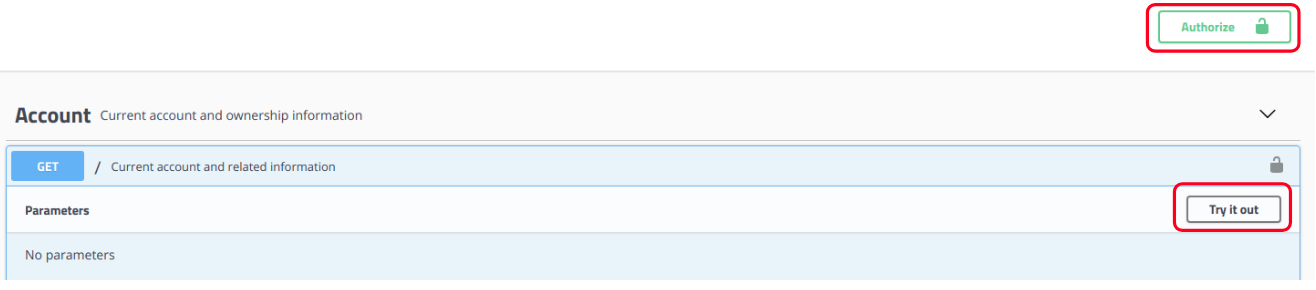\n\n1. Select `Authorize`.\n\n The **Available Authorizations** box is shown with the headers and values that are used for authentication in all API interactions with Swagger.\n\n 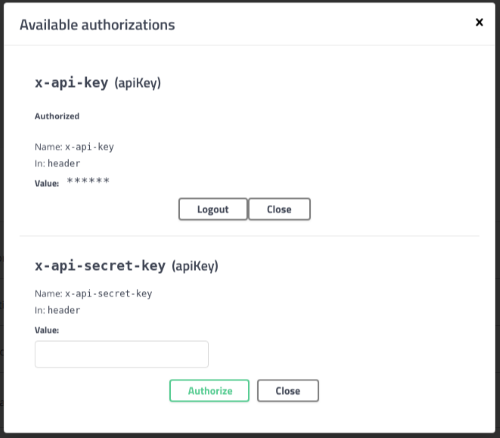\n\n1. Insert the API Key values:\n\n 1. Enter the [Account Key](https://redis.io/docs/latest/operate/rc/api/get-started/enable-the-api) as the `x-api-key` value and then choose **Authorize**.\n 1. Enter the [Secret Key](https://redis.io/docs/latest/operate/rc/api/get-started/manage-api-keys) as the `x-api-secret-key` value and then choose **Authorize**.\n 1. Select **Close**.\n\n> [!NOTE]\n> The key values are not saved when you refresh the page.\n\nWhen authorization is successful, the lock icon displays a closed lock.\n\n"
},
{
"id": "make-api-requests",
"title": "Make API requests",
"role": "content",
"text": "After you complete the authorization in the Swagger UI, you can make an API request:\n\n1. Open an action category and select an API operation.\n\n For example, in the `Account` category select the `GET /payment-methods` operation.\n\n \n\n1. Select **Try it out** and then select **Execute**.\n\n The API response is shown in the **Responses** section of the API operation.\n The results include an example of how to execute the same operation in a standard command-line utility using `cURL`.\n\n 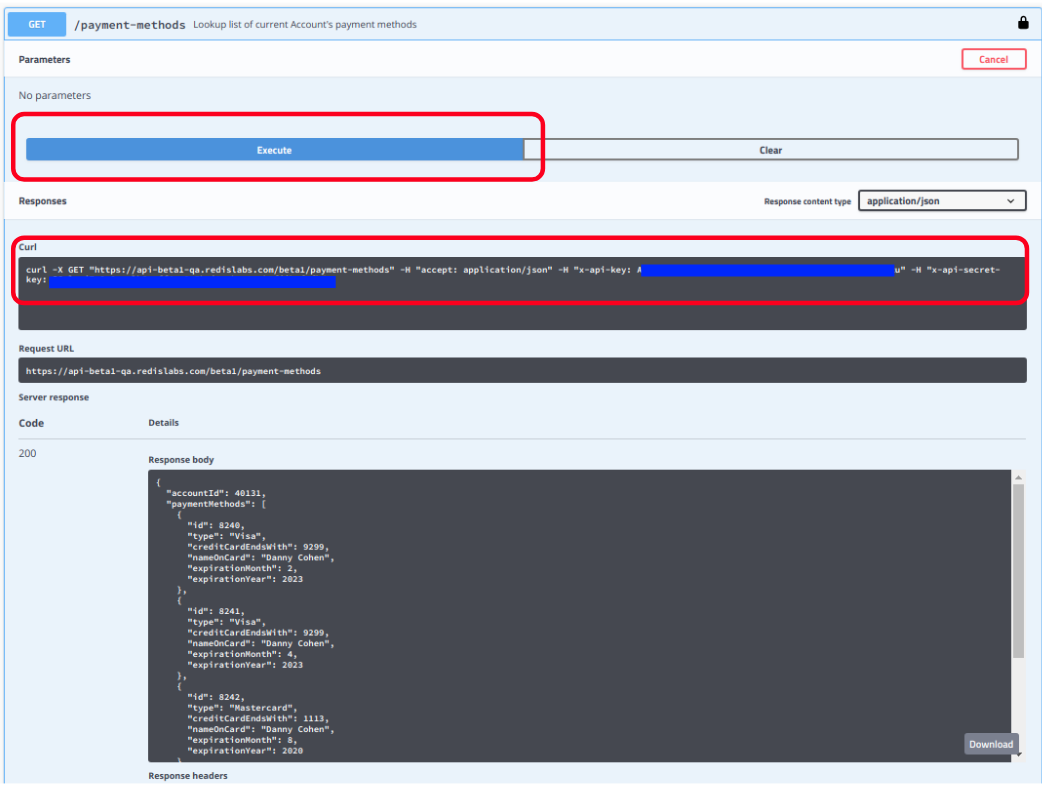\n\n#### Inputs for operations in Swagger\n\nSome API operations require input, such as:\n\n- **Parameters** - When an API operation requires URI parameters, such as \"get subscription by subscription id\", you can enter the values for the parameters.\n\n 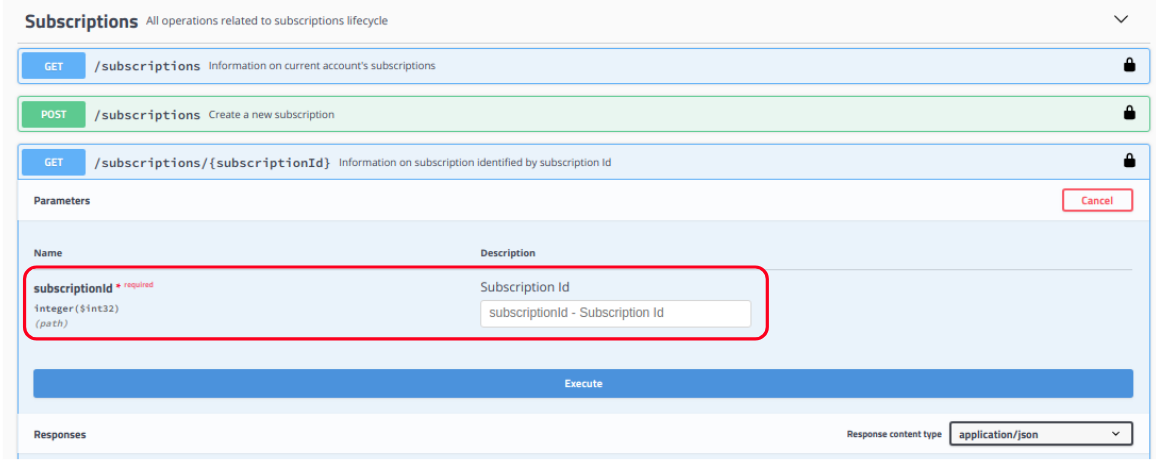\n\n- **JSON Request Body** - For API operations that require a JSON request body, you can either:\n\n - Use the **model display** to write the request based on the expected JSON structure and parameters.\n\n \n\n - Use the **Try it now** sample JSON created by Swagger as a base template that you can edit and execute.\n\n \n\n> [!WARNING]\n> The Swagger UI generates default JSON examples for `POST` and `PUT` operations. You should modify these examples to suit your specific needs and account settings. The examples will fail if used as-is.
For more examples showing how to use specific endpoints, see [REST API examples](https://redis.io/docs/latest/operate/rc/api/examples)."
},
{
"id": "use-the-curl-http-client",
"title": "Use the `cURL` HTTP client",
"role": "content",
"text": "`cURL` is a popular command line tool used to perform HTTP requests,\neither as individual commands or within shell scripts (such as bash and zsh).\nFor an introduction, see [How to start using cURL and why: a hands-on introduction](https://www.freecodecamp.org/news/how-to-start-using-curl-and-why-a-hands-on-introduction-ea1c913caaaa/).\n\n> [!INFO]\n> Our examples use `cURL` and Linux shell scripts to demonstrate the API; you can use any standard REST client or library.
\n> Our examples also use `jq`, [a JSON parser](https://stedolan.github.io/jq/). Use your package manager to install it (Example: `sudo apt install jq`)\n\nFor example, a standard API call to get System Log information looks like this in `cURL`:\n\n[code example]\n\n- The example expects several variables to be set in the Linux shell:\n\n - **$HOST** - The URI of the REST API host (`api.redislabs.com/v1`)\n - **$ACCOUNT_KEY** - The [account key value](https://redis.io/docs/latest/operate/rc/api/get-started/enable-the-api)\n - **$SECRET_KEY** - The personal [secret key value](https://redis.io/docs/latest/operate/rc/api/get-started/manage-api-keys)\n\n- The line \"`| jq -r .`\" means that the HTTP response will be piped (forwarded) to the `jq` JSON parser, and it will display only the raw output (\"`-r`\") of the root element (\"`.`\")\n- You can set the variables using shell commands like the following:\n\n"
}
],
"examples": [
{
"id": "use-the-curl-http-client-ex0",
"language": "bash",
"code": "curl -s -X GET \"https://$HOST/logs\" \\\n -H \"accept: application/json\" \\\n -H \"x-api-key: $ACCOUNT_KEY\" \\\n -H \"x-api-secret-key: $SECRET_KEY\" \\\n | jq -r .",
"section_id": "use-the-curl-http-client"
}
]
}