# Delete database
```json metadata
{
"schema_version": 2,
"title": "Delete database",
"description": "",
"categories": ["docs","operate","rc"],
"tableOfContents": {"sections":[]}
,
"codeExamples": []
}
```
Deleting a database requires the Account Owner role.
Deleted databases cannot be recovered. We recommend [making a backup](https://redis.io/docs/latest/operate/rc/databases/back-up-data), just in case.
Sign in to the [Redis Cloud console](https://cloud.redis.io/), then follow the steps for your plan to open the **Delete database** confirmation dialog.
**Essentials:**
1. Select the database from the list to open the **Database** screen.
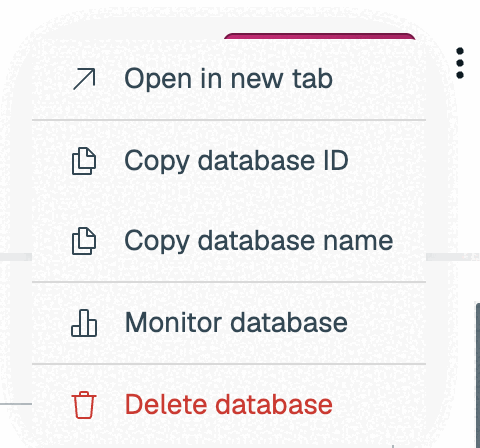
1. Select **More actions** > **Delete database**.
 **Pro:**
1. Select the database from the list. The **Configuration** tab is selected by default.
1. Scroll to the **Danger zone**.
**Pro:**
1. Select the database from the list. The **Configuration** tab is selected by default.
1. Scroll to the **Danger zone**.
 1. Select the **Delete** button.
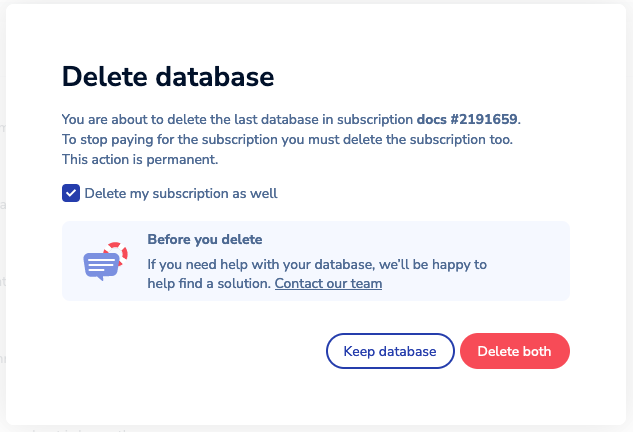
 The **Delete database** confirmation dialog appears. If this database is the only one in the subscription, you can also delete the subscription at this time.
- Select **Delete my subscription and stop my payment** to delete both the database and the subscription.
- Clear **Delete my subscription and stop my payment** to delete the database but keep the subscription.
> [!NOTE]
> You will continue to be charged for your subscription until you delete it, even if there are no databases in your subscription.
Select **Delete database** to confirm your choice.

When the operation completes, the database and its data are deleted.
The **Delete database** confirmation dialog appears. If this database is the only one in the subscription, you can also delete the subscription at this time.
- Select **Delete my subscription and stop my payment** to delete both the database and the subscription.
- Clear **Delete my subscription and stop my payment** to delete the database but keep the subscription.
> [!NOTE]
> You will continue to be charged for your subscription until you delete it, even if there are no databases in your subscription.

Select **Delete database** to confirm your choice.

When the operation completes, the database and its data are deleted.