{
"schema_version": 2,
"id": "operate/rc/databases/view-edit-database",
"title": "View and edit databases",
"url": "https://redis.io/docs/latest/operate/rc/databases/view-edit-database/",
"summary": "",
"tags": [
"docs",
"operate",
"rc"
],
"last_updated": "2026-10-02T16:06:07+01:00",
"page_type": "content",
"content_hash": "eca1fa8f802347b8d39b966c00a004888ddd391d13574f3d61c94a3bf1e5e57d",
"sections": [
{
"id": "overview",
"title": "Overview",
"role": "overview",
"text": "Use the **Databases** menu of the Redis Cloud console to manage your databases.\n\nTo view the details of a database:\n\n1. Sign in to the [Redis Cloud console](https://cloud.redis.io/). (Create an account if you don't already have one.)\n\n2. Select the **Databases** menu to display a [searchable list of all databases](#manage-the-database-list).\n \n3. Locate the database in the list.\n\n4. Select the database name to open the **Database** page.\n\nThe **Database** screen lets you review:\n- Configuration details of a database\n- Graphs showing performance metrics\n- Recent activity via a \"[slowlog](https://redis.io/docs/latest/commands/slowlog),\" which lists queries that exceed a certain execution time.\n\nFor help changing database settings, see [Edit database details](#edit-database-details)."
},
{
"id": "configuration-tab",
"title": "Configuration tab",
"role": "configuration",
"text": "The **Configuration** screen is divided into sections, each dedicated to a specific category. Note that not every section or setting is available to every [subscription plan](https://redis.io/docs/latest/operate/rc/subscriptions).\n\nThe Configuration tab is organized differently for Essentials and Pro databases. Select your plan type below.\n\n**Essentials:**"
},
{
"id": "performance--availability",
"title": "Performance & availability",
"role": "performance",
"text": "The **Performance & availability** section defines the plan and backup settings of your database.\n\n \n\n| Setting name | Editable | Description |\n|---|---|---|\n| **Plan** | ✅ Yes | The plan for your database.
Your Essentials plan determines the size of your database and other limits. For a comparison of available plans, see [Redis Cloud Essentials plans](https://redis.io/docs/latest/operate/rc/subscriptions/view-essentials-subscription/essentials-plan-details). |\n| **High Availability** | ✅ Yes | Whether and how your data replicates across multiple nodes; see [available options](https://redis.io/docs/latest/operate/rc/databases/configuration/high-availability) |\n| **Data persistence** | ✅ Yes | Defines whether (and how) data is saved to disk; see [available options](https://redis.io/docs/latest/operate/rc/databases/configuration/data-persistence) |\n| **Remote backup** | ✅ Yes | When enabled, identifies a location and interval for [data backups](https://redis.io/docs/latest/operate/rc/databases/back-up-data). |\n| **Data eviction policy** | ✅ Yes | Configures which [policy](https://redis.io/docs/latest/operate/rc/databases/configuration/data-eviction-policies) is applied when your database reaches its memory limit |"
},
{
"id": "access",
"title": "Access",
"role": "content",
"text": "The **Access** section shows the connection information for your database.\n\n \n\nHere, you can: \n- View the number of active connections to your database.\n- View the Public endpoint of your database.\n- Select **Connect** to [connect to your database](https://redis.io/docs/latest/operate/rc/databases/connect)"
},
{
"id": "data",
"title": "Data",
"role": "content",
"text": "In the **Data** section, you can:\n\n
\n\nHere, you can: \n- View the number of active connections to your database.\n- View the Public endpoint of your database.\n- Select **Connect** to [connect to your database](https://redis.io/docs/latest/operate/rc/databases/connect)"
},
{
"id": "data",
"title": "Data",
"role": "content",
"text": "In the **Data** section, you can:\n\n \n\n- [Import data](https://redis.io/docs/latest/operate/rc/databases/import-data) into your database\n- Open [Redis Insight](https://redis.io/docs/latest/operate/rc/databases/connect/insight-cloud) to explore your data."
},
{
"id": "security",
"title": "Security",
"role": "security",
"text": "The **Security** section helps you control access to your database.\n\n
\n\n- [Import data](https://redis.io/docs/latest/operate/rc/databases/import-data) into your database\n- Open [Redis Insight](https://redis.io/docs/latest/operate/rc/databases/connect/insight-cloud) to explore your data."
},
{
"id": "security",
"title": "Security",
"role": "security",
"text": "The **Security** section helps you control access to your database.\n\n \n\n| Setting name | Editable | Description |\n|---|---|---|\n| **Default user** | ✅ Yes | When **On**, permits access using the `default` username with a simple password. Select **Configure** to turn off the default user or change the password. See [Default user](https://redis.io/docs/latest/operate/rc/security/access-control/data-access-control/default-user) for more information. |\n| **CIDR allow list** | ✅ Yes | [Allow list](https://redis.io/docs/latest/operate/rc/security/cidr-whitelist) of IP addresses/security groups permitted to access the database. Select **Configure** to edit the CIDR allow list. |\n| **Transport layer security (TLS)** | ✅ Yes | Select **Configure** to turn on [transport layer security](https://redis.io/docs/latest/operate/rc/security/database-security/tls-ssl) (TLS) encryption for database access. |"
},
{
"id": "database-info",
"title": "Database info",
"role": "content",
"text": "The **Database info** section defines basic properties about your database.\n\n
\n\n| Setting name | Editable | Description |\n|---|---|---|\n| **Default user** | ✅ Yes | When **On**, permits access using the `default` username with a simple password. Select **Configure** to turn off the default user or change the password. See [Default user](https://redis.io/docs/latest/operate/rc/security/access-control/data-access-control/default-user) for more information. |\n| **CIDR allow list** | ✅ Yes | [Allow list](https://redis.io/docs/latest/operate/rc/security/cidr-whitelist) of IP addresses/security groups permitted to access the database. Select **Configure** to edit the CIDR allow list. |\n| **Transport layer security (TLS)** | ✅ Yes | Select **Configure** to turn on [transport layer security](https://redis.io/docs/latest/operate/rc/security/database-security/tls-ssl) (TLS) encryption for database access. |"
},
{
"id": "database-info",
"title": "Database info",
"role": "content",
"text": "The **Database info** section defines basic properties about your database.\n\n \n\n| Setting name | Editable | Description |\n|---|---|---|\n| **Name** | ✅ Yes | The name given to your database |\n| **ID** | ❌ No | The database's numeric ID |\n| **Creation** | ❌ No | Date the database was created |\n| **Last changed** | ❌ No | Date of last update |\n| **Advanced Capabilities** | ❌ No | This setting appears when an [advanced capability](https://redis.io/docs/latest/operate/rc/databases/configuration/advanced-capabilities) is enabled for a database |\n| **Architecture** | ❌ No | Shows whether the database runs in **RAM** or is a [**Flex**](https://redis.io/docs/latest/operate/rc/databases/create-database/create-flex-database) database |\n| **Version** | ✅ Yes | The Redis version your database uses |\n| **Protocol** | ✅ Yes | Shows which version of RESP the database uses. See [Redis serialization protocol](https://redis.io/docs/latest/develop/reference/protocol-spec#resp-versions) for details |\n\n**Pro:**"
},
{
"id": "general-settings",
"title": "General settings",
"role": "content",
"text": "The **General** section defines basic properties about your database.\n\n
\n\n| Setting name | Editable | Description |\n|---|---|---|\n| **Name** | ✅ Yes | The name given to your database |\n| **ID** | ❌ No | The database's numeric ID |\n| **Creation** | ❌ No | Date the database was created |\n| **Last changed** | ❌ No | Date of last update |\n| **Advanced Capabilities** | ❌ No | This setting appears when an [advanced capability](https://redis.io/docs/latest/operate/rc/databases/configuration/advanced-capabilities) is enabled for a database |\n| **Architecture** | ❌ No | Shows whether the database runs in **RAM** or is a [**Flex**](https://redis.io/docs/latest/operate/rc/databases/create-database/create-flex-database) database |\n| **Version** | ✅ Yes | The Redis version your database uses |\n| **Protocol** | ✅ Yes | Shows which version of RESP the database uses. See [Redis serialization protocol](https://redis.io/docs/latest/develop/reference/protocol-spec#resp-versions) for details |\n\n**Pro:**"
},
{
"id": "general-settings",
"title": "General settings",
"role": "content",
"text": "The **General** section defines basic properties about your database.\n\n \n\nThe available settings vary according to your cloud provider and design choices. \n\n| Setting name | Editable | Description |\n|:--------------------------|:---------|:------------|\n| **Database Name** | ✅ Yes | The name given to your database |\n| **Subscription Name** | ❌ No | The name for the subscription your database is a part of |\n| **Public endpoint** | ❌ No | Public URI used by any application or client to access the database. You can [block the public endpoint](https://redis.io/docs/latest/operate/rc/security/database-security/block-public-endpoints). |\n| **Private endpoint** | ❌ No | Private endpoint URI available to approved clients; use CIDR allow list, VPC peering, or other connectivity options to enable access. |\n| **Tags** | ✅ Yes | A list of the [tags](https://redis.io/docs/latest/operate/rc/databases/tag-database) associated with the database. Select [Manage tags](https://redis.io/docs/latest/operate/rc/databases/tag-database#configuration-tab) to manage the database tags. |\n| **Vendor** | ❌ No | The Cloud vendor hosting your database: AWS, Google Cloud, or Azure. |\n| **Region** | ❌ No | The Cloud vendor region hosting your database |\n| **Type** | ❌ No | Displays 'Redis', 'Redis Stack' or 'memcached' based on the value selected when the database was created |\n| **Redis version** | ❌ No | Redis version of the database |\n| **Auto Tiering** | ❌ No | Checked when the subscription supports Auto Tiering |\n| **Active-Active Redis** | ❌ No | Checked when the database is part of an [Active-Active](https://redis.io/docs/latest/operate/rc/databases/active-active) relationship |\n| **Creation time** | ❌ No | Date and time the database was created |\n| **Last changed** | ❌ No | Date and time of last update |\n| **Supported Protocol(s)** | ✅ Yes | Shows which version of RESP the database uses. See [Redis serialization protocol](https://redis.io/docs/latest/develop/reference/protocol-spec#resp-versions) for details |\n| **Advanced Capabilities** | ❌ No | This setting appears when an [advanced capability](https://redis.io/docs/latest/operate/rc/databases/configuration/advanced-capabilities) is enabled for a database |"
},
{
"id": "performance-section",
"title": "Performance section",
"role": "performance",
"text": "The **Performance** section describes the memory size, throughput, and hashing policy for a database.\n\n
\n\nThe available settings vary according to your cloud provider and design choices. \n\n| Setting name | Editable | Description |\n|:--------------------------|:---------|:------------|\n| **Database Name** | ✅ Yes | The name given to your database |\n| **Subscription Name** | ❌ No | The name for the subscription your database is a part of |\n| **Public endpoint** | ❌ No | Public URI used by any application or client to access the database. You can [block the public endpoint](https://redis.io/docs/latest/operate/rc/security/database-security/block-public-endpoints). |\n| **Private endpoint** | ❌ No | Private endpoint URI available to approved clients; use CIDR allow list, VPC peering, or other connectivity options to enable access. |\n| **Tags** | ✅ Yes | A list of the [tags](https://redis.io/docs/latest/operate/rc/databases/tag-database) associated with the database. Select [Manage tags](https://redis.io/docs/latest/operate/rc/databases/tag-database#configuration-tab) to manage the database tags. |\n| **Vendor** | ❌ No | The Cloud vendor hosting your database: AWS, Google Cloud, or Azure. |\n| **Region** | ❌ No | The Cloud vendor region hosting your database |\n| **Type** | ❌ No | Displays 'Redis', 'Redis Stack' or 'memcached' based on the value selected when the database was created |\n| **Redis version** | ❌ No | Redis version of the database |\n| **Auto Tiering** | ❌ No | Checked when the subscription supports Auto Tiering |\n| **Active-Active Redis** | ❌ No | Checked when the database is part of an [Active-Active](https://redis.io/docs/latest/operate/rc/databases/active-active) relationship |\n| **Creation time** | ❌ No | Date and time the database was created |\n| **Last changed** | ❌ No | Date and time of last update |\n| **Supported Protocol(s)** | ✅ Yes | Shows which version of RESP the database uses. See [Redis serialization protocol](https://redis.io/docs/latest/develop/reference/protocol-spec#resp-versions) for details |\n| **Advanced Capabilities** | ❌ No | This setting appears when an [advanced capability](https://redis.io/docs/latest/operate/rc/databases/configuration/advanced-capabilities) is enabled for a database |"
},
{
"id": "performance-section",
"title": "Performance section",
"role": "performance",
"text": "The **Performance** section describes the memory size, throughput, and hashing policy for a database.\n\n \n\n| Setting name | Editable | Description |\n|:----------------------|:---------|:------------|\n| **Dataset size** | ✅ Yes | Maximum size (in GB) for your dataset. See [Dataset size](https://redis.io/docs/latest/operate/rc/databases/configuration/sizing#dataset-size). |\n| **Throughput** | ✅ Yes | Defines [throughput](https://redis.io/docs/latest/operate/rc/databases/configuration/sizing#throughput) in terms of maximum operations per second for the database. |\n| **Memory used** | ❌ No | Memory currently used for your database. |\n| **High availability** | ✅ Yes | Replicates your data across multiple nodes; see [available options](https://redis.io/docs/latest/operate/rc/databases/configuration/high-availability) |\n| **Hashing policy** | ✅ Yes | Defines the [hashing policy](https://redis.io/docs/latest/operate/rc/databases/configuration/clustering#manage-the-hashing-policy). |\n| **OSS Cluster API** | ✅ Yes | Enables the [Cluster API](https://redis.io/docs/latest/operate/rc/databases/configuration/clustering#oss-cluster-api) for a database.
When this option is enabled, you cannot define a custom hashing policy.|\n\nTo learn more about these settings and when to use them, see [Sizing](https://redis.io/docs/latest/operate/rc/databases/configuration/sizing) and [Database clustering](https://redis.io/docs/latest/operate/rc/databases/configuration/clustering)."
},
{
"id": "durability-section",
"title": "Durability section",
"role": "content",
"text": "The Durability section helps protect your data when problems occur. These settings define replication, persistence, backup, and eviction policies.\n\n \n\n| Setting name | Editable | Description |\n|:-------------------------|:---------|:------------|\n| **Data persistence** | ✅ Yes | Defines whether (and how) data is saved to disk; see [available options](https://redis.io/docs/latest/operate/rc/databases/configuration/data-persistence) |\n| **Data eviction policy** | ✅ Yes | Configures which [policy](https://redis.io/docs/latest/operate/rc/databases/configuration/data-eviction-policies) is applied when your database reaches its memory limit |\n| **Remote backup** | ✅ Yes | When enabled, identifies a location and interval for [data backups](https://redis.io/docs/latest/operate/rc/databases/back-up-data). |\n| **Active-Passive Redis** | ✅ Yes | When enabled, identifies a path to the [linked database](https://redis.io/docs/latest/operate/rc/databases/migrate-databases#sync-using-active-passive). |"
},
{
"id": "security-section",
"title": "Security section",
"role": "security",
"text": "The **Security** section helps you control access to your database.\n\n
\n\n| Setting name | Editable | Description |\n|:-------------------------|:---------|:------------|\n| **Data persistence** | ✅ Yes | Defines whether (and how) data is saved to disk; see [available options](https://redis.io/docs/latest/operate/rc/databases/configuration/data-persistence) |\n| **Data eviction policy** | ✅ Yes | Configures which [policy](https://redis.io/docs/latest/operate/rc/databases/configuration/data-eviction-policies) is applied when your database reaches its memory limit |\n| **Remote backup** | ✅ Yes | When enabled, identifies a location and interval for [data backups](https://redis.io/docs/latest/operate/rc/databases/back-up-data). |\n| **Active-Passive Redis** | ✅ Yes | When enabled, identifies a path to the [linked database](https://redis.io/docs/latest/operate/rc/databases/migrate-databases#sync-using-active-passive). |"
},
{
"id": "security-section",
"title": "Security section",
"role": "security",
"text": "The **Security** section helps you control access to your database.\n\n \n\n|Setting name| Editable | Description |\n|:-----------|:---------|:------------|\n| **Default user** | ✅ Yes | When enabled, permits access using a simple password |\n| **Default user password** | ✅ Yes | Password for default user. A default password is assigned to the database on creation and may be updated. If you [block the public endpoint](https://redis.io/docs/latest/operate/rc/security/database-security/block-public-endpoints), you can also turn on passwordless authentication for the default user here. |\n| **CIDR allow list** | ✅ Yes | [Allow list](https://redis.io/docs/latest/operate/rc/security/cidr-whitelist) of IP addresses/security groups permitted to access the database. |\n| **Transport layer security (TLS)** | ✅ Yes | Enables [transport layer security](https://redis.io/docs/latest/operate/rc/security/database-security/tls-ssl) (TLS) encryption for database access. |"
},
{
"id": "alerts-section",
"title": "Alerts section",
"role": "content",
"text": "The **Alerts** section defines notification emails sent to your account and the conditions that trigger them.\n\n
\n\n|Setting name| Editable | Description |\n|:-----------|:---------|:------------|\n| **Default user** | ✅ Yes | When enabled, permits access using a simple password |\n| **Default user password** | ✅ Yes | Password for default user. A default password is assigned to the database on creation and may be updated. If you [block the public endpoint](https://redis.io/docs/latest/operate/rc/security/database-security/block-public-endpoints), you can also turn on passwordless authentication for the default user here. |\n| **CIDR allow list** | ✅ Yes | [Allow list](https://redis.io/docs/latest/operate/rc/security/cidr-whitelist) of IP addresses/security groups permitted to access the database. |\n| **Transport layer security (TLS)** | ✅ Yes | Enables [transport layer security](https://redis.io/docs/latest/operate/rc/security/database-security/tls-ssl) (TLS) encryption for database access. |"
},
{
"id": "alerts-section",
"title": "Alerts section",
"role": "content",
"text": "The **Alerts** section defines notification emails sent to your account and the conditions that trigger them.\n\n \n\nThe available alerts vary according to the plan type. See [Configure alerts](https://redis.io/docs/latest/operate/rc/databases/monitor-performance#configure-metric-alerts) for more information."
},
{
"id": "danger-zone",
"title": "Danger zone",
"role": "content",
"text": "Actions in the **Danger Zone** are permanent and should not be taken lightly.\n\n
\n\nThe available alerts vary according to the plan type. See [Configure alerts](https://redis.io/docs/latest/operate/rc/databases/monitor-performance#configure-metric-alerts) for more information."
},
{
"id": "danger-zone",
"title": "Danger zone",
"role": "content",
"text": "Actions in the **Danger Zone** are permanent and should not be taken lightly.\n\n \n\nHere, you can:\n\n- Delete the database. Databases must be active before they can be deleted. To learn more, see [Delete a database](https://redis.io/docs/latest/operate/rc/databases/delete-database).\n- Flush the database (_Active-Active databases only_).\n\nFor best results, we recommend [backing up data](https://redis.io/docs/latest/operate/rc/databases/back-up-data) before any danger zone actions."
},
{
"id": "other-actions-and-info",
"title": "Other actions and info",
"role": "content",
"text": "The **View Database** screen also has tabs that let you view:\n\n- **Metrics**: a series of graphs showing database performance over time. See [Monitor performance](https://redis.io/docs/latest/operate/rc/databases/monitor-performance) for more information.\n\n- **Slowlog**: a log showing recent [slow queries](https://redis.io/docs/latest/commands/slowlog) run against your database. The log displays when the action started, the duration, the complexity of the operation, and any parameters passed to the operation.\n\n- **Alerts** (_Essentials databases only_): the notification emails sent to your account and the conditions that trigger them. See [Configure alerts](https://redis.io/docs/latest/operate/rc/databases/monitor-performance#configure-metric-alerts) for more information."
},
{
"id": "edit-database-details",
"title": "Edit database details",
"role": "content",
"text": "Editing your database depends on your plan type. Select your plan type to learn more.\n\n**Essentials:**\n\nYou can make direct changes to your database on the database page. Any changes you make won't be saved until you review and confirm them.\n\nAfter you've made changes to your database, select **Review changes** to review your changes. If your changes result in any cost changes, you'll see the cost change there.\n\n
\n\nHere, you can:\n\n- Delete the database. Databases must be active before they can be deleted. To learn more, see [Delete a database](https://redis.io/docs/latest/operate/rc/databases/delete-database).\n- Flush the database (_Active-Active databases only_).\n\nFor best results, we recommend [backing up data](https://redis.io/docs/latest/operate/rc/databases/back-up-data) before any danger zone actions."
},
{
"id": "other-actions-and-info",
"title": "Other actions and info",
"role": "content",
"text": "The **View Database** screen also has tabs that let you view:\n\n- **Metrics**: a series of graphs showing database performance over time. See [Monitor performance](https://redis.io/docs/latest/operate/rc/databases/monitor-performance) for more information.\n\n- **Slowlog**: a log showing recent [slow queries](https://redis.io/docs/latest/commands/slowlog) run against your database. The log displays when the action started, the duration, the complexity of the operation, and any parameters passed to the operation.\n\n- **Alerts** (_Essentials databases only_): the notification emails sent to your account and the conditions that trigger them. See [Configure alerts](https://redis.io/docs/latest/operate/rc/databases/monitor-performance#configure-metric-alerts) for more information."
},
{
"id": "edit-database-details",
"title": "Edit database details",
"role": "content",
"text": "Editing your database depends on your plan type. Select your plan type to learn more.\n\n**Essentials:**\n\nYou can make direct changes to your database on the database page. Any changes you make won't be saved until you review and confirm them.\n\nAfter you've made changes to your database, select **Review changes** to review your changes. If your changes result in any cost changes, you'll see the cost change there.\n\n \n\nFrom there, select **Confirm** or **Confirm & pay** to save your changes.\n\n**Pro:**\n\nUse the **Edit** button to edit database details.\n\n
 \n\nChoose **Save database** to save your changes.\n\n
 \n\n\n\nBecause databases exist within the context of a deployment, certain fields cannot be updated, especially those that might lead to data loss. Refer to the tables in the previous sections for your plan to learn which settings are editable.\n\nIf you need to change other details, create a new database and then migrate existing data."
},
{
"id": "manage-the-database-list",
"title": "Manage the database list",
"role": "content",
"text": "The **Databases** list summarizes the status of all databases associated with your account. \n\nYou can:\n\n- Search by typing into the search box located above the database list.\n\n \n\n- Filter by selecting a filter type and then selecting the checkbox next to the options you want to include from the dropdown. Select the Filter toggle, located on the right of the search bar, if the filter types are hidden.\n\n \n\n You can filter the list on **Status**, **Subscription**, **Subscription Type**, **Capabilities**, **Options**, **Tags**, and **Version**. \n\n A list of selected filters appears below the filter types.\n\n To remove a filter click the **x** to the right of the name of that filter. To remove all filters, select **Clear all**.\n\n \n\n- Select **Columns** to change what information is displayed on the list.\n\n 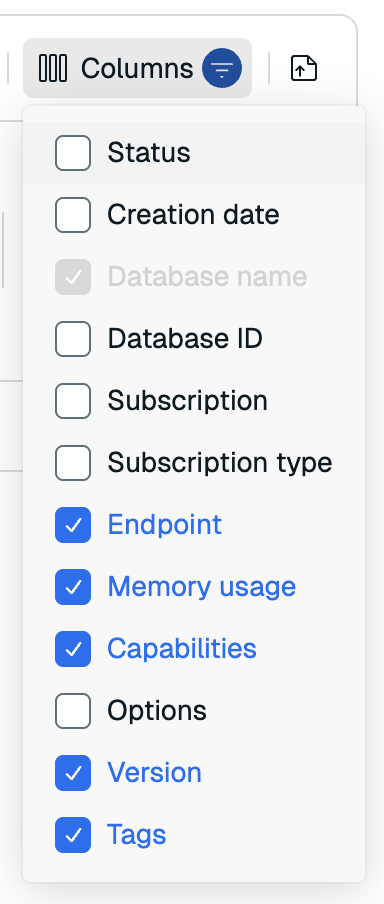\n\n- Select the **Export** button to export the current view as a CSV file.\n\n \n\n- Sort the list in descending or ascending order using the arrow displayed to right of the field name in the header. Supported fields include **Subscription**, **Database name**, **Memory usage**, and **Version**.\n\n  \n\n Select the arrow icon to change the sort order. One sort order can be active at any given time.\n\n- Use the controls in the list footer to change the number of items displayed in the list or to navigate.\n\nSort orders and filter expressions are not saved between console sessions."
}
],
"examples": []
}
\n\n\n\nBecause databases exist within the context of a deployment, certain fields cannot be updated, especially those that might lead to data loss. Refer to the tables in the previous sections for your plan to learn which settings are editable.\n\nIf you need to change other details, create a new database and then migrate existing data."
},
{
"id": "manage-the-database-list",
"title": "Manage the database list",
"role": "content",
"text": "The **Databases** list summarizes the status of all databases associated with your account. \n\nYou can:\n\n- Search by typing into the search box located above the database list.\n\n \n\n- Filter by selecting a filter type and then selecting the checkbox next to the options you want to include from the dropdown. Select the Filter toggle, located on the right of the search bar, if the filter types are hidden.\n\n \n\n You can filter the list on **Status**, **Subscription**, **Subscription Type**, **Capabilities**, **Options**, **Tags**, and **Version**. \n\n A list of selected filters appears below the filter types.\n\n To remove a filter click the **x** to the right of the name of that filter. To remove all filters, select **Clear all**.\n\n \n\n- Select **Columns** to change what information is displayed on the list.\n\n \n\n- Select the **Export** button to export the current view as a CSV file.\n\n \n\n- Sort the list in descending or ascending order using the arrow displayed to right of the field name in the header. Supported fields include **Subscription**, **Database name**, **Memory usage**, and **Version**.\n\n  \n\n Select the arrow icon to change the sort order. One sort order can be active at any given time.\n\n- Use the controls in the list footer to change the number of items displayed in the list or to navigate.\n\nSort orders and filter expressions are not saved between console sessions."
}
],
"examples": []
}