{
  "schema_version": 2,
  "id": "operate/rc/security/access-control/access-management",
  "title": "Access management",
  "url": "https://redis.io/docs/latest/operate/rc/security/access-control/access-management/",
  "summary": "Control who can make changes to your databases using the Redis Cloud console.",
  "tags": [
    "docs",
    "operate",
    "rc"
  ],
  "last_updated": "2026-10-02T16:06:07+01:00",
  "page_type": "content",
  "content_hash": "f860469c5f9030e121afaa89440a6b94b30f65d74aeb7558a251c901aa2b72ba",
  "sections": [
    {
      "id": "overview",
      "title": "Overview",
      "role": "overview",
      "text": "The **Access management** screen helps you manage:\n\n- The team of users allowed to access your subscription and its databases.\n- The API keys that authenticate application access to your account.\n- [Single sign-on (SSO) with SAML](https://redis.io/docs/latest/operate/rc/security/access-control/saml-sso).\n\nHere, you learn how to manage your team's users and control their level of access. \n\nFor help managing API keys, see [Manage API keys](https://redis.io/docs/latest/operate/rc/api/get-started/manage-api-keys)."
    },
    {
      "id": "manage-team-access",
      "title": "Manage team access",
      "role": "content",
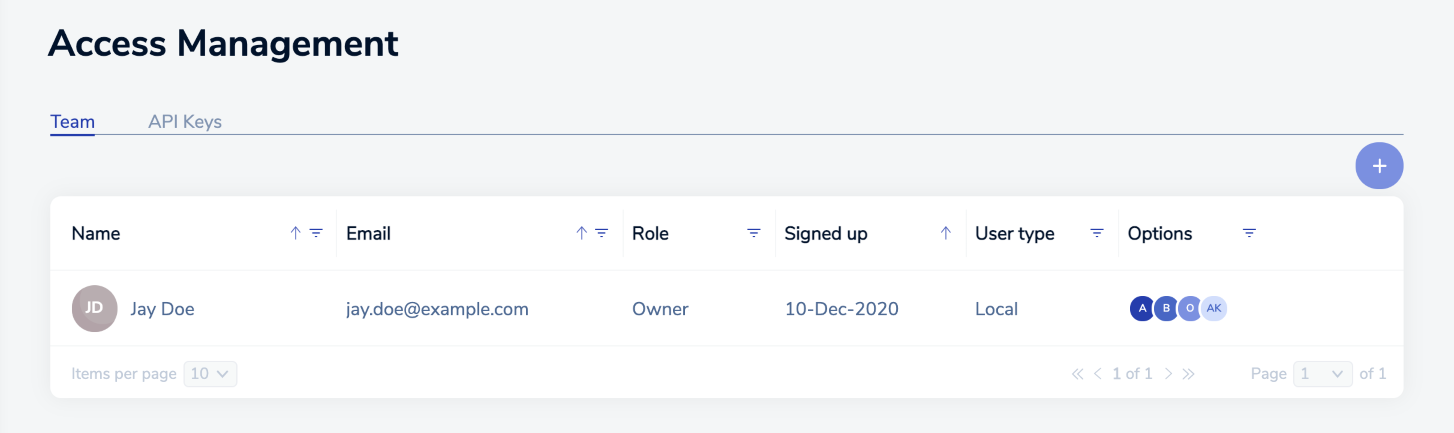
      "text": "The **Team** tab lets you manage the people allowed to access your account. Each authorized person is assigned to a role that specifies their privileges.\n\n![The Access management tab helps you manage the people allowed to access your subscription.](https://redis.io/docs/latest/images/rc/access-management-team-tab.png)\n\nThe list contains one entry summarizing the team settings for each user in your team. By default, the list includes the account owner.\n\nThe list includes several buttons and icons to help you manage the list:\n\n| Icon | Description |\n|------|-------------|\n| ![Use the Add button to add members to your team.](https://redis.io/docs/latest/images/rc/icon-add.png#no-click) | The **Add** button lets you add members to your team |\n| ![Use the Edit button change details for a team member.](https://redis.io/docs/latest/images/rc/icon-edit.png#no-click) | The **Edit** button lets you edit the settings for the selected team member |\n| ![Use the Delete button to remove a member from your team.](https://redis.io/docs/latest/images/rc/icon-delete-teal.png#no-click) | The **Delete** button lets you remove members from your team\n| <nobr>![The Sort ascending button displays members in ascending order according to the values of the selected field.](https://redis.io/docs/latest/images/rc/icon-list-sort-asc.png#no-click)![The Sort descending button displays members in descending order according to the values of the selected field.](https://redis.io/docs/latest/images/rc/icon-list-sort-desc.png#no-click)</nobr> | The **Sort ascending** and **Sort descending** icons display the list according to the selected order |\n\nYou can also use the list search to find a specific user or filter by **Role**, **User Type**, or **Options**."
    },
    {
      "id": "add-user",
      "title": "Add user",
      "role": "content",
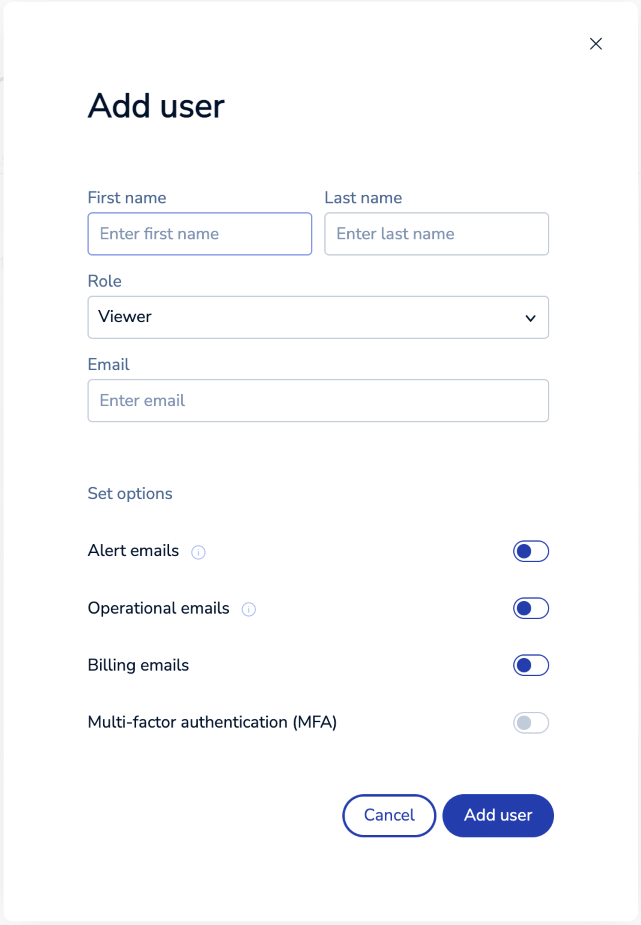
      "text": "When you add a member to your team, the **Add user** dialog appears.  \n\n![Use the Add User dialog to specify the details for your new user.](https://redis.io/docs/latest/images/rc/access-mgmt-add-user-dialog.png)\n\nUse the dialog to specify these values.\n\n| Setting | Description |\n|---------|-------------|\n| **First name** | First name of the user displayed in the Redis Cloud console and in email messages |\n| **Last name** | Last name of the user displayed in the Redis Cloud console and in email messages |\n| **Role** | The role identifies their subscription and account privileges.  For details, see [Team management roles](#team-management-roles). |\n| **Email** | The address used for alerts and other email messages regarding the account | \n| **Alert emails** | Enable to be notified when subscription databases cross certain thresholds, such as exceeding memory limits or latency requirements |\n| **Operational emails** | Notifications about subscription and database changes, such as creating or deleting a database, and [subscription and database maintenance](https://redis.io/docs/latest/operate/rc/subscriptions/maintenance) |\n| **Billing emails** | Notifications about billing, such as when bills are issued and paid |\n| **Multi-factor authentication** | Whether MFA is enabled for the member.  This is deactivated when members have not enabled or confirmed MFA in their user profile settings. |\n\nUse the **Add user** button to save your new team member details. \n\nRedis will send an activation email to the user once their details are saved. After following the activation link, they can sign in."
    },
    {
      "id": "edit-user",
      "title": "Edit user",
      "role": "content",
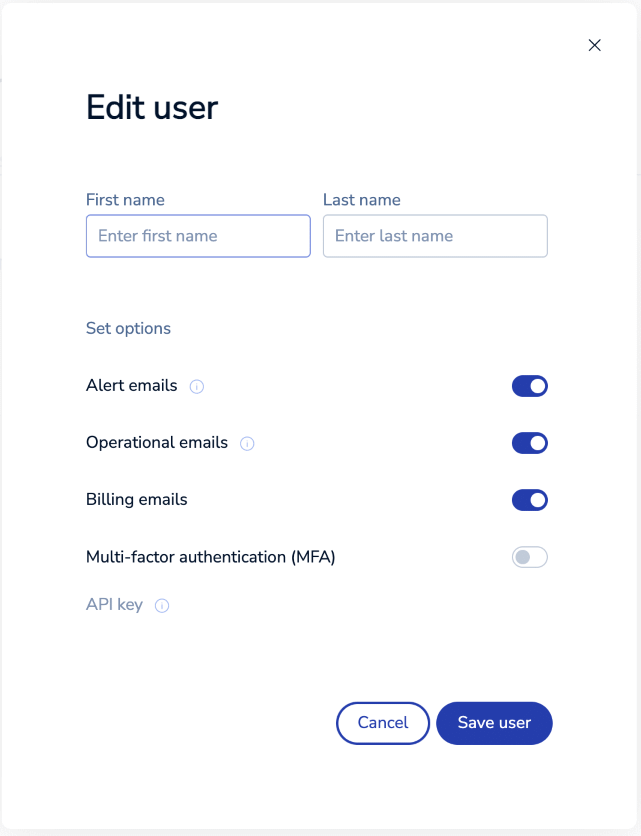
      "text": "To edit user team details, select the user from the list and then select the **Edit** button.\nThe **Edit user** dialog displays the details you can change.  \n\n![Use the Edit User dialog to change the details for a user](https://redis.io/docs/latest/images/rc/access-mgmt-edit-user-dialog.png)\n\nYou can change any detail except the team member's email address.\n\nSelect **Save user** to save your changes."
    },
    {
      "id": "delete-user",
      "title": "Delete user",
      "role": "content",
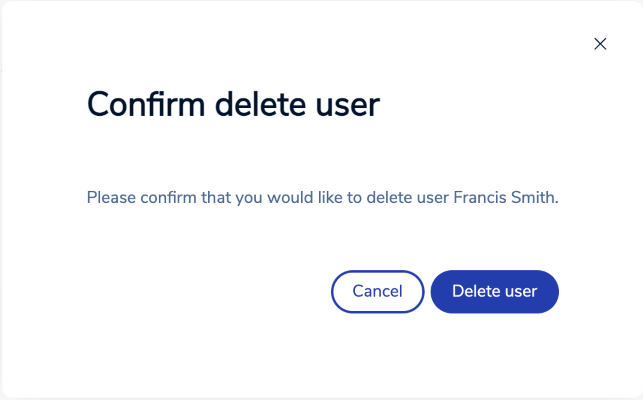
      "text": "To remove a member from your team, select them from the list and then select the **Delete** button. A confirmation dialog appears.  \n\n![Confirm that you want to remove a user from your team](https://redis.io/docs/latest/images/rc/access-management-delete-user-dialog.png)\n\nSelect **Delete user** to confirm removal. This is a permanent action that cannot be undone."
    },
    {
      "id": "team-management-roles",
      "title": "Team management roles",
      "role": "content",
      "text": "Each team member is assigned a role that identifies their privileges and limits their activities in the Redis Cloud console.\n\nRoles and responsibilities are:\n\n- **Owner** can view, create, and edit any settings in the account.\n\n    Each subscription must have at least one account owner. Accounts can have multiple owners.\n\n    Owners can also manage subscriptions, databases, and API keys.\n\n- **Billing Admin** can view and edit settings related to billing and payments.\n\n    Billing Admins can add and remove payment methods and change the payment method for a subscription, but they cannot change any other subscription or database settings.\n\n- **Manager** can view, create, and edit any setting in the subscription. \n\n    Managers can change subscription costs and change payment methods associated with a subscription, but they cannot add or remove available payment methods.\n\n- **Member** can view, create, and edit databases in ways that do not impact costs.\n\n    Members cannot create databases or edit databases in ways that impact costs.\n\n- **Viewer** can view all databases and their configurations, including database secrets.\n\n- **Logs viewer** can not access the Redis Cloud console. They are only allowed access to the [Redis Cloud API](https://redis.io/docs/latest/operate/rc/api) [`GET logs/`](https://redis.io/docs/latest/operate/rc/api/api-reference#tag/Account/operation/getAccountSystemLogs) endpoint. \n\nThis table shows each role's ability to perform common tasks.\n\n| **Task** | **Owner** | **Billing Admin** | **Manager** | **Member** | **Viewer** | **Logs Viewer** |\n|---|---|---|---|---|---|---|\n| Access management | <span title=\"Owners can manage account access\"><nobr>&#x2705; Yes</nobr></span> | <span title=\"Billing Admins may not manage account access\"><nobr>&#x274c; No</nobr></span> | <span title=\"Managers may not manage account access\"><nobr>&#x274c; No</nobr></span> | <span title=\"Members may not manage account access\"><nobr>&#x274c; No</nobr></span> | <span title=\"Viewers may not manage account access\"><nobr>&#x274c; No</nobr></span> | <span title=\"Logs Viewers may not manage account access\"><nobr>&#x274c; No</nobr></span> |\n| Account settings | <span title=\"Owners can change account settings\"><nobr>&#x2705; Yes</nobr></span> | <span title=\"Billing Admins can change the billing address in account settings\"><nobr>&#x2705; Yes<sup>[1](#table-note-1)</sup></nobr></span> | <span title=\"Managers may not manage account settings\"><nobr>&#x274c; No</nobr></span> | <span title=\"Members may not manage account settings\"><nobr>&#x274c; No</nobr></span> | <span title=\"Viewers may not manage account settings\"><nobr>&#x274c; No</nobr></span> | <span title=\"Logs Viewers may not manage account settings\"><nobr>&#x274c; No</nobr></span> |\n| Billing & payments | <span title=\"Owners can add/remove payment methods and view history\"><nobr>&#x2705; Yes</nobr></span> | <span title=\"Billing Admins can add/remove payment methods and view history\"><nobr>&#x2705; Yes</nobr></span> | <span title=\"Managers may not add/remove payment methods or view billing history (Managers may change subscription payment methods between those available to the account)\"><nobr>&#x274c; No<sup>[2](#table-note-2)</sup></nobr></span> | <span title=\"Members may not add/remove payment methods or view billing history\"><nobr>&#x274c; No</nobr></span> | <span title=\"Viewers may not add/remove payment methods or view billing history\"><nobr>&#x274c; No</nobr></span> | <span title=\"Logs viewers may not add/remove payment methods or view billing history\"><nobr>&#x274c; No</nobr></span> |\n| Create subscription | <span title=\"Owners can create new subscriptions\"><nobr>&#x2705; Yes</nobr></span> | <span title=\"Billing Admins may not create subscriptions\"><nobr>&#x274c; No</nobr></span> | <span title=\"Managers can create new subscriptions\"><nobr>&#x2705; Yes</nobr></span> | <span title=\"Members may not create subscriptions\"><nobr>&#x274c; No</nobr></span> | <span title=\"Viewers may not create subscriptions\"><nobr>&#x274c; No</nobr></span> | <span title=\"Logs viewers may not create subscriptions\"><nobr>&#x274c; No</nobr></span> |\n| Edit subscription | <span title=\"Owners can edit subscriptions\"><nobr>&#x2705; Yes</nobr></span> | <span title=\"Billing Admins can edit subscriptions to change the payment method\"><nobr>&#x2705; Yes<sup>[3](#table-note-3)</sup></nobr></span> | <span title=\"Managers can edit subscriptions\"><nobr>&#x2705; Yes</nobr></span> | <span title=\"Members may not edit subscriptions\"><nobr>&#x274c; No</nobr></span> | <span title=\"Viewers may not edit subscriptions\"><nobr>&#x274c; No</nobr></span> | <span title=\"Logs viewers may not edit subscriptions\"><nobr>&#x274c; No</nobr></span> |\n| Create database (affects cost) | <span title=\"Owners can create databases when doing so will impact costs\"><nobr>&#x2705; Yes</nobr></span> | <span title=\"Billing Admins may not create databases when doing so will impact costs\"><nobr>&#x274c; No</nobr></span> | <span title=\"Managers can create databases when doing so will impact costs\"><nobr>&#x2705; Yes</nobr></span> | <span title=\"Members may not create databases when doing so will impact costs\"><nobr>&#x274c; No</nobr></span> | <span title=\"Viewers may not create databases when doing so will impact costs\"><nobr>&#x274c; No</nobr></span> | <span title=\"Logs viewers may not create databases when doing so will impact costs\"><nobr>&#x274c; No</nobr></span> |\n| Edit database (affects cost) | <span title=\"Owners can edit databases in ways that will impact costs\"><nobr>&#x2705; Yes</nobr></span> | <span title=\"Billing Admins may not edit databases in ways that impact costs\"><nobr>&#x274c; No</nobr></span> | <span title=\"Managers can edit databases in ways that impact costs\"><nobr>&#x2705; Yes</nobr></span> | <span title=\"Members may not edit databases in ways that impact costs\"><nobr>&#x274c; No</nobr></span> | <span title=\"Viewers may not edit databases in ways that impact costs\"><nobr>&#x274c; No</nobr></span> | <span title=\"Logs viewers may not edit databases in ways that impact costs\"><nobr>&#x274c; No</nobr></span> |\n| Create database (no cost impact) | <span title=\"Owners can create databases when doing so will not impact costs\"><nobr>&#x2705; Yes</nobr></span> | <span title=\"Billing Admins may not create databases when doing so will not impact costs\"><nobr>&#x274c; No</nobr></span> | <span title=\"Managers can create databases when doing so will not impact costs\"><nobr>&#x2705; Yes</nobr></span> | <span title=\"Members can not create databases when doing so will not impact costs\"><nobr>&#x274c; No</nobr></span> | <span title=\"Viewers may not create databases when doing so will not impact costs\"><nobr>&#x274c; No</nobr></span> | <span title=\"Logs viewers may not create databases when doing so will not impact costs\"><nobr>&#x274c; No</nobr></span> |\n| Edit database (no cost impact) | <span title=\"Owners can edit databases in ways that do not impact costs\"><nobr>&#x2705; Yes</nobr></span> | <span title=\"Billing Admins may not change databases in ways that do not affect costs\"><nobr>&#x274c; No</nobr></span> | <span title=\"Managers can change databases in ways that do not affect costs\"><nobr>&#x2705; Yes</nobr></span> | <span title=\"Members can change databases in ways that do not affect costs\"><nobr>&#x2705; Yes</nobr></span> | <span title=\"Viewers may not change databases in ways that do not affect costs\"><nobr>&#x274c; No</nobr></span> | <span title=\"Logs viewers may not change databases in ways that do not affect costs\"><nobr>&#x274c; No</nobr></span> |\n| View subscription | <span title=\"Owners can view subscription details\"><nobr>&#x2705; Yes</nobr></span> | <span title=\"Billing Admins can view subscription details\"><nobr>&#x2705; Yes</nobr></span> | <span title=\"Managers can view subscription details\"><nobr>&#x2705; Yes</nobr></span> | <span title=\"Members can view subscription details\"><nobr>&#x2705; Yes</nobr></span> | <span title=\"Viewers can view subscription details\"><nobr>&#x2705; Yes</nobr></span> | <span title=\"Logs viewers may not view subscriptions\"><nobr>&#x274c; No</nobr></span> |\n| View database | <span title=\"Owners can view database details\"><nobr>&#x2705; Yes</nobr></span> | <span title=\"Billing Admins can view the list of databases but not database details\"><nobr>&#x2705; Yes<sup>[4](#table-note-4)</sup></nobr></span> | <span title=\"Managers can view database details\"><nobr>&#x2705; Yes</nobr></span> | <span title=\"Members can view database details\"><nobr>&#x2705; Yes</nobr></span> | <span title=\"Viewers can view database details\"><nobr>&#x2705; Yes</nobr></span> | <span title=\"Logs viewers may not view databases\"><nobr>&#x274c; No</nobr></span> |\n| Use the [REST API](https://redis.io/docs/latest/operate/rc/api) | <span title=\"Owners can use the Redis Cloud API\"><nobr>&#x2705; Yes</nobr></span> | <span title=\"Billing Admins can use the Redis Cloud REST API for billing data\"><nobr>&#x2705; Yes<sup>[5](#table-note-5)</sup></nobr></span> | <span title=\"Managers may not use the REST API\"><nobr>&#x274c; No</nobr></span> | <span title=\"Members may not use the REST API\"><nobr>&#x274c; No</nobr></span> | <span title=\"Viewers can use the REST API for GET requests only\"><nobr>&#x2705; Yes<sup>[6](#table-note-6)</sup></nobr></span> | <span title=\"Logs viewers can use the REST API for GET /logs only\"><nobr>&#x2705; Yes<sup>[7](#table-note-7)</sup></nobr></span> |\n\n1. <a name=\"table-note-1\" style=\"display: block; height: 80px; margin-top: -80px;\"></a>Billing Admins can only edit the account billing address in Account Settings.\n\n2. <a name=\"table-note-2\" style=\"display: block; height: 80px; margin-top: -80px;\"></a>Managers are able to view existing payment methods and assign them as payment methods for subscriptions, but they cannot add or remove payment methods.\n\n3. <a name=\"table-note-3\" style=\"display: block; height: 80px; margin-top: -80px;\"></a>Billing Admins can only change the payment method when editing a subscription.\n\n4. <a name=\"table-note-4\" style=\"display: block; height: 80px; margin-top: -80px;\"></a>Billing Admins can see the list of databases, but can not see database details, including connection details.\n\n5. <a name=\"table-note-5\" style=\"display: block; height: 80px; margin-top: -80px;\"></a>Billing admins can use REST API for billing data.\n\n6. <a name=\"table-note-6\" style=\"display: block; height: 80px; margin-top: -80px;\"></a>Viewers can use the REST API for GET requests, but cannot modify subscription or database details.\n\n7. <a name=\"table-note-7\" style=\"display: block; height: 80px; margin-top: -80px;\"></a>Logs viewers can only use the [`GET logs/`](https://redis.io/docs/latest/operate/rc/api/api-reference#tag/Account/operation/getAccountSystemLogs) endpoint of the REST API."
    }
  ],
  "examples": []
}
