{
"schema_version": 2,
"id": "operate/rc/security/access-control/data-access-control/role-based-access-control",
"title": "Enable Role-based access control",
"url": "https://redis.io/docs/latest/operate/rc/security/access-control/data-access-control/role-based-access-control/",
"summary": "Lets you define multiple users with fine-grained data authorization features.",
"tags": [
"docs",
"operate",
"rc"
],
"last_updated": "2026-10-01T14:41:35+01:00",
"page_type": "content",
"content_hash": "6d053569c5b2c3ee26720d0d8db8f1e82aabfd9ed5ff777e14e4c0534c75b083",
"sections": [
{
"id": "overview",
"title": "Overview",
"role": "overview",
"text": "Role-based access control (RBAC) lets you define *roles* with specific sets of *permissions*. You can then assign *users* to these roles\nto provide appropriate levels of access.\n\nRBAC effectively lets you implement the [principle of least privilege](https://en.wikipedia.org/wiki/Principle_of_least_privilege). For example, you can provide\nread-only access to an application whose only job is to display Redis data. Similarly, you can prevent new developers from running dangerous administrative commands."
},
{
"id": "set-up-rbac",
"title": "Set up RBAC",
"role": "content",
"text": "To set up RBAC, first navigate to the **Data Access Control** screen.\n\nThere are three tabs on this screen: **Users**, **Roles**, and **Redis ACLs**.\n\nIn the **Redis ACLs** tab, you [define named *permissions*](https://redis.io/docs/latest/operate/rc/security/access-control/data-access-control/configure-acls) for specific Redis commands, keys, and pub/sub channels.\n\n\n\nIn the **Roles** tab, you [create roles](https://redis.io/docs/latest/operate/rc/security/access-control/data-access-control/create-roles). Each role consists of a set of permissions for one or more Redis Cloud databases.\n\n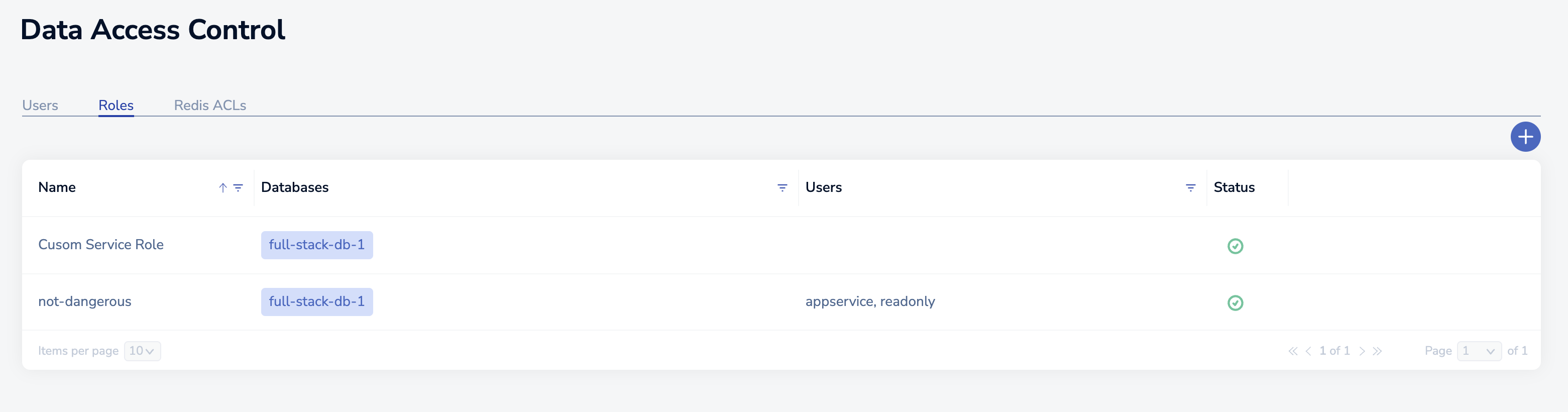\n\nFinally, in the **Users** tab, you [create users](https://redis.io/docs/latest/operate/rc/security/access-control/data-access-control/create-assign-users) and [assign each user a role](https://redis.io/docs/latest/operate/rc/security/access-control/data-access-control/create-assign-users#assign-roles-to-existing-users).\n\n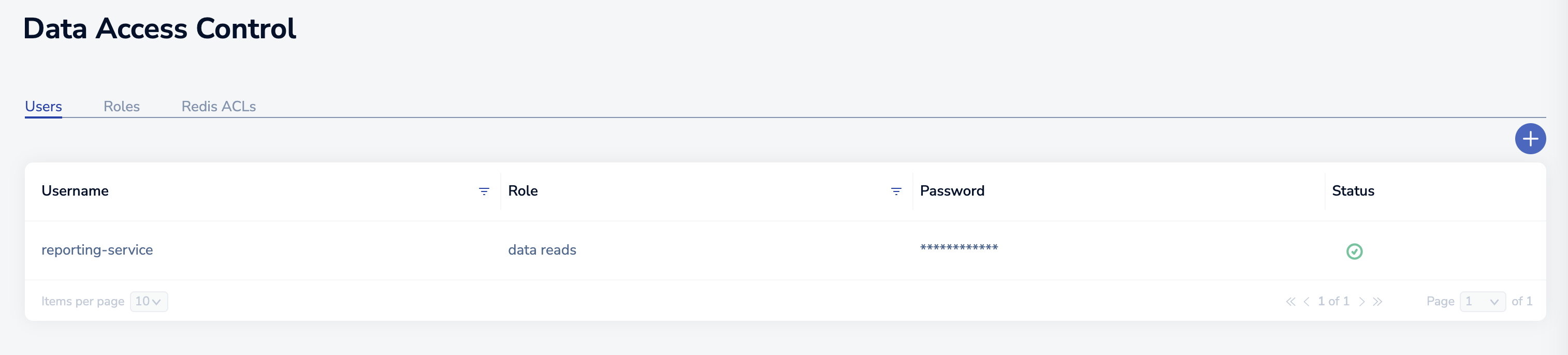\n\n> [!NOTE]\n> Database access users are different from account access users. To learn more, see [Access management](https://redis.io/docs/latest/operate/rc/security/access-control)."
},
{
"id": "redis-acls-vs-redis-cloud-rbac",
"title": "Redis ACLs vs. Redis Cloud RBAC",
"role": "content",
"text": "In Redis, you can create users and assign ACLs to them using the `ACL` command. However, \nRedis does not support generic roles.\n\nIn Redis Cloud, you configure RBAC using the Redis Cloud console. As a result, certain Redis ACL\nsubcommands are not available in Redis Cloud. The following table shows which ACL commands are supported.\n\n| Command | Supported |\n|:--------|:----------|\n| [ACL CAT](https://redis.io/docs/latest/commands/acl-cat) | ✅ Supported | ✅ Supported \n| [ACL DELUSER](https://redis.io/docs/latest/commands/acl-deluser) | ❌ Not supported| ❌ Not supported| |\n| [ACL DRYRUN](https://redis.io/docs/latest/commands/acl-dryrun) | ✅ Supported | ✅ Supported \n| [ACL GENPASS](https://redis.io/docs/latest/commands/acl-genpass) | ❌ Not supported| ❌ Not supported| |\n| [ACL GETUSER](https://redis.io/docs/latest/commands/acl-getuser) | ✅ Supported | ✅ Supported \n| [ACL HELP](https://redis.io/docs/latest/commands/acl-help) | ✅ Supported | ✅ Supported \n| [ACL LIST](https://redis.io/docs/latest/commands/acl-list) | ✅ Supported | ✅ Supported \n| [ACL LOAD](https://redis.io/docs/latest/commands/acl-load) | ❌ Not supported| ❌ Not supported| |\n| [ACL LOG](https://redis.io/docs/latest/commands/acl-log) | ❌ Not supported| ❌ Not supported| |\n| [ACL SAVE](https://redis.io/docs/latest/commands/acl-save) | ❌ Not supported| ❌ Not supported| |\n| [ACL SETUSER](https://redis.io/docs/latest/commands/acl-setuser) | ❌ Not supported| ❌ Not supported| |\n| [ACL USERS](https://redis.io/docs/latest/commands/acl-users) | ✅ Supported |\n| [ACL WHOAMI](https://redis.io/docs/latest/commands/acl-whoami) | ✅ Supported |\n\n\nIn Redis, you must explicitly provide access to the `MULTI`, `EXEC`, and `DISCARD` commands.\nIn Redis Cloud, these commands, which are used in transactions, are always permitted. However, the commands\nrun within the transaction block are subject to RBAC permissions.\n\nWhen you run multi-key commands on multi-slot keys, the return value is `failure` but the command runs on the keys that are allowed."
}
],
"examples": []
}