{
"schema_version": 2,
"id": "operate/rs/installing-upgrading/upgrading/upgrade-cluster",
"title": "Upgrade a Redis Software cluster",
"url": "https://redis.io/docs/latest/operate/rs/installing-upgrading/upgrading/upgrade-cluster/",
"summary": "Upgrade a cluster to a later version of Redis Software.",
"tags": [
"docs",
"operate",
"rs"
],
"last_updated": "2026-10-01T15:48:36+01:00",
"page_type": "content",
"content_hash": "2c7f415693f9efaba2415419df0b4b3d46eb3dd34e9ef38ab60507d32ed62626",
"sections": [
{
"id": "overview",
"title": "Overview",
"role": "overview",
"text": "Before you upgrade a cluster to a later Redis Software version, review the [supported upgrade paths](#supported-upgrade-paths) and [prerequisites](#upgrade-prerequisites).\n\nTo upgrade a cluster's Redis Software version, use one of the following methods:\n\n- [In-place upgrade](#in-place-upgrade) - Directly upgrade Redis Software on each node in the cluster. Although this method is simpler than the rolling upgrade method, it might cause brief service interruptions as each node is upgraded.\n\n- [Rolling upgrade](#rolling-upgrade) - Minimize downtime by adding new nodes with an updated Redis Software version to the cluster, one at a time, while keeping the rest of the cluster operational. This method is recommended for production environments that require continuous availability."
},
{
"id": "supported-upgrade-paths",
"title": "Supported upgrade paths",
"role": "compatibility",
"text": "✅ Supported – You can upgrade directly from the current Redis Software cluster version.\n\n:x: Not supported – You cannot upgrade directly from the current Redis Software cluster version. You must first upgrade to a supported intermediate version.\n\n| Current Redis Software cluster version | Upgrade to Redis Software 7.2.x | Upgrade to Redis Software 7.4.x | Upgrade to Redis Software 7.8.x | Upgrade to Redis Software 7.22.x | Upgrade to Redis Software 8.0.2-8.0.10 | Upgrade to Redis Software 8.0.16-8.0.20 | Upgrade to Redis Software 8.2.x |\n|:-----------------------:|:----------------:|:----------------:|:----------------:|:----------------:|:----------------:|:----------------:|:----------------:|\n| 6.0.x | ✅ | :x: | :x: | :x: | :x: | :x: | :x: |\n| 6.2.4
6.2.8 | ✅ | ✅ | :x: | :x: | :x: | :x: | :x: |\n| 6.2.10
6.2.12
6.2.18 | ✅ | ✅ | ✅ | :x: | :x: | :x: | :x: |\n| 6.4.x | ✅ | ✅ | ✅ | ✅ | ✅ | :x: | :x: |\n| 7.2.x | ✅ | ✅ | ✅ | ✅ | ✅ | ✅ | ✅ |\n| 7.4.x | – | ✅ | ✅ | ✅ | ✅ | ✅ | ✅ |\n| 7.8.x | – | – | ✅ | ✅ | ✅ | ✅ | ✅ |\n| 7.22.x | – | – | – | ✅ | ✅ | ✅ | ✅ |\n| 8.0.2
8.0.6
8.0.10 | – | – | – | – | ✅ | ✅ | ✅ |\n| 8.0.16
8.0.18
8.0.20 | – | – | – | – | - | ✅ | ✅ |\n| 8.2.x | – | – | – | – | – | – | ✅ |\n\n\nSee the [Redis Software product lifecycle](https://redis.io/docs/latest/operate/rs/installing-upgrading/product-lifecycle) for more information about release numbers and the end-of-life schedule.\n\n> [!NOTE]\n> Redis Enterprise for Kubernetes has its own support lifecycle, which accounts for the Kubernetes distribution lifecycle. For details, see [Supported Kubernetes distributions](https://redis.io/docs/latest/operate/kubernetes/reference/supported_k8s_distributions)."
},
{
"id": "upgrade-prerequisites",
"title": "Upgrade prerequisites",
"role": "content",
"text": "Before upgrading a cluster:\n\n- Verify access to [rlcheck](https://redis.io/docs/latest/operate/rs/references/cli-utilities/rlcheck) and [rladmin](https://redis.io/docs/latest/operate/rs/references/cli-utilities/rladmin#use-the-rladmin-shell) commands.\n\n- Run [rlcheck](https://redis.io/docs/latest/operate/rs/references/cli-utilities/rlcheck) on each node and verify there are no issues:\n\n [code example]\n\n- Verify [maintenance mode](https://redis.io/docs/latest/operate/rs/clusters/maintenance-mode) is not enabled:\n\n 1. On a node in the cluster, run [`rladmin status`](https://redis.io/docs/latest/operate/rs/references/cli-utilities/rladmin/status):\n \n [code example] \n \n 1. Review each node's `SHARDS` field. If the value is yellow, the node is in maintenance mode.\n\n 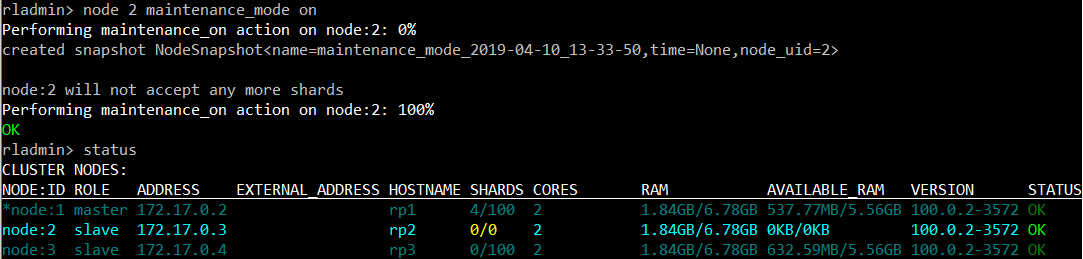\n\n 1. To deactivate maintenance mode on a node, run the following [`rladmin node maintenance_mode off`](https://redis.io/docs/latest/operate/rs/references/cli-utilities/rladmin/node/maintenance-mode#node-maintenance_mode-off) command. See [Deactivate maintenance mode](https://redis.io/docs/latest/operate/rs/clusters/maintenance-mode#deactivate-maintenance-mode) for additional details.\n\n [code example]\n\n- Verify that you meet the upgrade path requirements for the target cluster version and review the relevant [release notes](https://redis.io/docs/latest/operate/rs/release-notes) for any preparation instructions.\n\n- Before you upgrade a cluster from Redis Software version 6.2.x to 7.8.x, you must follow these steps if the cluster has any databases with Redis version 6.0:\n\n 1. Set the Redis upgrade policy to `latest`:\n\n [code example]\n\n 1. [Upgrade Redis 6.0 databases](https://redis.io/docs/latest/operate/rs/installing-upgrading/upgrading/upgrade-database) to Redis 6.2.\n\n- [Upgrade your databases](https://redis.io/docs/latest/operate/rs/installing-upgrading/upgrading/upgrade-database) to a version that is supported by the target Redis Software version before upgrading the cluster. We recommend you upgrade the databases to the latest supported version if possible. Make sure to test the upgrade in a non-production environment to determine any impact.\n\n- Avoid changing the database configuration or performing other cluster management operations during the cluster upgrade process, as this might cause unexpected results.\n\n- Upgrade the cluster's primary (master) node first. To identify the primary node, use one of the following methods:\n\n - **Nodes** screen in the new Cluster Manager UI (only available for Redis Software versions 7.2 and later)\n\n - [`rladmin status nodes`](https://redis.io/docs/latest/operate/rs/references/cli-utilities/rladmin/status#status-nodes) command\n \n - [`GET /nodes/status`](https://redis.io/docs/latest/operate/rs/references/rest-api/requests/nodes/status#get-all-nodes-status) REST API request"
},
{
"id": "in-place-upgrade",
"title": "In-place upgrade",
"role": "content",
"text": "Starting with the primary node, follow these steps for every node in the cluster. To ensure cluster availability, upgrade each node separately.\n\n1. Complete all [prerequisites](#upgrade-prerequisites) before starting the upgrade.\n\n1. Verify node operation with the following commands:\n\n [code example]\n\n > [!WARNING]\n > Do not proceed if any shard, node, or endpoint is not `OK`.\n\n1. Download the Redis Software installation package to the machine running the node from the Download Center on [https://cloud.redis.io](https://cloud.redis.io). \n\n1. Extract the installation package:\n\n [code example]\n\n > [!NOTE]\n > You cannot change the installation path or the user during the upgrade.\n\n1. Run the install command. See [installation script options](https://redis.io/docs/latest/operate/rs/installing-upgrading/install/install-script) for a list of command-line options you can add to the following command. You cannot use options marked as \"new installs only\" during an in-place upgrade.\n\n [code example]\n\n The installation script automatically recognizes the upgrade and responds accordingly.\n\n The upgrade replaces all node processes, which might briefly interrupt any active connections.\n\n1. Verify the node was upgraded to the new version and is still operational:\n\n [code example]\n\n1. Visit the Cluster Manager UI.\n\n If the Cluster Manager UI was open in a web browser during the upgrade, refresh the browser to reload the console."
},
{
"id": "rolling-upgrade",
"title": "Rolling upgrade",
"role": "content",
"text": "To perform a rolling upgrade of the cluster, use one of the following methods:\n\n- [Extra node method](#extra-node-upgrade) - recommended if you have additional resources available\n\n- [Replace node method](#replace-node-upgrade) - recommended if you cannot temporarily allocate additional resources"
},
{
"id": "extra-node-upgrade",
"title": "Extra node upgrade method",
"role": "content",
"text": "1. Complete all [prerequisites](#upgrade-prerequisites) before starting the rolling upgrade.\n\n1. [Install a later version of Redis Software](https://redis.io/docs/latest/operate/rs/installing-upgrading/install/install-on-linux) on a new node.\n\n1. [Add the new node](https://redis.io/docs/latest/operate/rs/clusters/add-node) to the cluster.\n\n1. If the [cluster uses DNS](https://redis.io/docs/latest/operate/rs/networking/cluster-dns), add the new node’s IP address to the DNS records.\n\n1. [Promote the first new node](https://redis.io/docs/latest/operate/rs/clusters/change-node-role#promote-secondary-node) to become the primary node.\n\n1. [Remove one node](https://redis.io/docs/latest/operate/rs/clusters/remove-node#remove-a-node) running the earlier Redis Software version from the cluster.\n\n1. Repeat the previous steps until all nodes with the earlier Redis Software version are removed. If the final node to remove from the cluster is the primary node, [demote it](https://redis.io/docs/latest/operate/rs/clusters/change-node-role#demote-primary-node) to a secondary node before you remove it."
},
{
"id": "replace-node-upgrade",
"title": "Replace node upgrade method",
"role": "content",
"text": "1. Complete all [prerequisites](#upgrade-prerequisites) before starting the rolling upgrade.\n\n1. [Remove a node](https://redis.io/docs/latest/operate/rs/clusters/remove-node#remove-a-node) with the earlier Redis Software version from the cluster.\n\n1. Uninstall Redis Software from the removed node:\n\n [code example]\n\n1. [Install a later version of Redis Software](https://redis.io/docs/latest/operate/rs/installing-upgrading/install/install-on-linux) on the removed node or a new node.\n\n1. [Add the new node](https://redis.io/docs/latest/operate/rs/clusters/add-node) to the cluster.\n\n If you want to reuse the removed node's ID when you add the node to the cluster, run [`rladmin cluster join`](https://redis.io/docs/latest/operate/rs/references/cli-utilities/rladmin/cluster/join) with the `replace_node` flag:\n\n [code example]\n\n1. If the [cluster uses DNS](https://redis.io/docs/latest/operate/rs/networking/cluster-dns), add the new node’s IP address to the DNS records.\n\n1. [Promote the first new node](https://redis.io/docs/latest/operate/rs/clusters/change-node-role#promote-secondary-node) to become the primary node.\n\n1. Verify node health:\n\n 1. Run `rlcheck` on all nodes:\n\n [code example]\n\n The output lists the result of each verification test:\n\n [code example]\n\n For healthy nodes, the expected output is `ALL TESTS PASSED`.\n\n 1. Run [`rladmin status`](https://redis.io/docs/latest/operate/rs/references/cli-utilities/rladmin/status) on the new node:\n\n [code example]\n\n The expected output is the `OK` status for the cluster, nodes, endpoints, and shards:\n\n [code example]\n\n1. Repeat the previous steps until all nodes with the earlier Redis Software version are replaced. If the final node to remove from the cluster is the primary node, [demote it](https://redis.io/docs/latest/operate/rs/clusters/change-node-role#demote-primary-node) to a secondary node before you remove it."
},
{
"id": "after-cluster-upgrade",
"title": "After cluster upgrade",
"role": "content",
"text": "After all nodes are upgraded, the cluster is fully upgraded. Certain features introduced in the new version of Redis Software only become available after upgrading the entire cluster.\n\n[code example]"
}
],
"examples": [
{
"id": "upgrade-prerequisites-ex0",
"language": "sh",
"code": "rlcheck",
"section_id": "upgrade-prerequisites"
},
{
"id": "upgrade-prerequisites-ex1",
"language": "sh",
"code": "rladmin status",
"section_id": "upgrade-prerequisites"
},
{
"id": "upgrade-prerequisites-ex2",
"language": "sh",
"code": "rladmin node maintenance_mode off",
"section_id": "upgrade-prerequisites"
},
{
"id": "upgrade-prerequisites-ex3",
"language": "sh",
"code": "rladmin tune cluster redis_upgrade_policy latest",
"section_id": "upgrade-prerequisites"
},
{
"id": "in-place-upgrade-ex0",
"language": " shell",
"code": "$ rlcheck\n $ rladmin status extra all",
"section_id": "in-place-upgrade"
},
{
"id": "in-place-upgrade-ex1",
"language": "sh",
"code": "tar vxf ",
"section_id": "in-place-upgrade"
},
{
"id": "in-place-upgrade-ex2",
"language": " shell",
"code": "sudo ./install.sh",
"section_id": "in-place-upgrade"
},
{
"id": "in-place-upgrade-ex3",
"language": " shell",
"code": "$ rlcheck\n $ rladmin status extra all",
"section_id": "in-place-upgrade"
},
{
"id": "replace-node-upgrade-ex0",
"language": "sh",
"code": "sudo ./rl_uninstall.sh",
"section_id": "replace-node-upgrade"
},
{
"id": "replace-node-upgrade-ex1",
"language": "sh",
"code": "rladmin cluster join nodes username password replace_node ",
"section_id": "replace-node-upgrade"
},
{
"id": "replace-node-upgrade-ex2",
"language": "sh",
"code": "rlcheck",
"section_id": "replace-node-upgrade"
},
{
"id": "replace-node-upgrade-ex3",
"language": "sh",
"code": "##### Welcome to Redis Software Cluster settings verification utility ####\n Running test: verify_bootstrap_status\n\t\t PASS\n ...\n Running test: verify_encrypted_gossip\n\t\t PASS\n Summary:\n -------\n ALL TESTS PASSED.",
"section_id": "replace-node-upgrade"
},
{
"id": "replace-node-upgrade-ex4",
"language": "sh",
"code": "rladmin status extra all",
"section_id": "replace-node-upgrade"
},
{
"id": "replace-node-upgrade-ex5",
"language": "sh",
"code": "CLUSTER:\n OK. Cluster master: 2 ()\n Cluster health: OK, [0, 0.0, 0.0]\n failures/minute - avg1 0.00, avg15 0.00, avg60 0.00.\n ...",
"section_id": "replace-node-upgrade"
},
{
"id": "after-cluster-upgrade-ex0",
"language": "sh",
"code": "supervisorctl restart cnm_exec",
"section_id": "after-cluster-upgrade"
}
]
}