{
"schema_version": 2,
"id": "operate/rs/installing-upgrading/upgrading/upgrade-database",
"title": "Upgrade a Redis Software database",
"url": "https://redis.io/docs/latest/operate/rs/installing-upgrading/upgrading/upgrade-database/",
"summary": "Upgrade a Redis Software database.",
"tags": [
"docs",
"operate",
"rs"
],
"last_updated": "2026-10-06T08:53:14-07:00",
"page_type": "content",
"content_hash": "6060d86df85ae2615cea3a93f379f47394ab01cf9376a13ad56b7d73fce6ab8c",
"sections": [
{
"id": "default-db-versions",
"title": "Default Redis database versions",
"role": "overview",
"text": "When you upgrade an existing database, it uses the latest bundled Redis version unless you specify a different version with the `redis_version` option in the [REST API](https://redis.io/docs/latest/operate/rs/references/rest-api/requests/bdbs) or [`rladmin upgrade db`](https://redis.io/docs/latest/operate/rs/references/cli-utilities/rladmin/upgrade#upgrade-db).\n\nTo view available Redis database versions:\n\n- In the Cluster Manager UI, see **Redis database versions** on the **Cluster > Configuration** screen.\n\n- Send a [`GET /nodes` REST API request](https://redis.io/docs/latest/operate/rs/references/rest-api/requests/nodes) and see `supported_database_versions` in the response.\n\nThe default Redis database version differs between Redis Software releases as follows:\n\n\n| Redis Software
cluster version | Bundled Redis
DB versions | Default DB version
(upgraded/new databases) |\n|-------|----------|-----|\n| 8.2.0 | 6.2, 7.2, 7.4, 8.0, 8.2, 8.4, 8.6 | 8.6 |\n| 8.0.20 | 6.2, 7.2, 7.4, 8.0, 8.2, 8.4, 8.6 | 8.6 |\n| 8.0.18 | 6.2, 7.2, 7.4, 8.0, 8.2, 8.4, 8.6 | 8.6 |\n| 8.0.16 | 6.2, 7.2, 7.4, 8.0, 8.2, 8.4 | 8.4 |\n| 8.0.10 | 6.2, 7.2, 7.4, 8.0, 8.2, 8.4 | 8.4 |\n| 8.0.6 | 6.2, 7.2, 7.4, 8.0, 8.2 | 8.2 |\n| 8.0.2 | 6.2, 7.2, 7.4, 8.0, 8.2 | 8.2 |\n| 7.22.x | 6.2, 7.2, 7.4 | 7.4 |\n| 7.8.x | 6.2, 7.2, 7.4 | 7.4 |\n| 7.4.x | 6.0, 6.2, 7.2 | 7.2 |\n| 7.2.4 | 6.0, 6.2, 7.2 | 7.2 |\n| 6.4.2 | 6.0, 6.2 | 6.2 |\n| 6.2.x | 6.0, 6.2 | 6.0 |"
},
{
"id": "upgrade-prerequisites",
"title": "Upgrade prerequisites",
"role": "content",
"text": "Before upgrading a database:\n\n- Review the relevant [release notes](https://redis.io/docs/latest/operate/rs/release-notes) for any preparation instructions.\n\n- Verify that both the [current database version and the target database version are supported](#db-versions-table) by the cluster's Redis Software version.\n\n To determine the current database version:\n\n - Use the Cluster Manager UI to open the **Configuration** tab for the database and select  **About**.\n\n - _(Optional)_ Use the [`rladmin status extra all`](https://redis.io/docs/latest/operate/rs/references/cli-utilities/rladmin/status) command to display configuration details:\n\n [code example]\n \n When the database compatibility version is outdated, `OLD REDIS VERSION` appears in the command output.\n\n- Verify the cluster is fully upgraded and operational.\n\n Use the Cluster Manager UI to display the **Configuration** tab for the cluster. The tab displays the cluster version information and the Redis database compatibility version.\n\n- For [Replica Of databases](https://redis.io/docs/latest/operate/rs/databases/import-export/replica-of), upgrade the destination database before the source database.\n\n- Check client compatibility with the database version.\n\n If you run Redis Stack commands with Go-Redis versions 9 and later or Lettuce versions 6 and later, set the client’s protocol version to RESP2 before upgrading your database to Redis version 7.2 to prevent potential application issues due to RESP3 breaking changes. See [Client prerequisites for Redis 7.2 upgrade](https://redis.io/docs/latest/operate/rs/references/compatibility/resp#client-prerequisites-for-redis-72-upgrade) for more details and examples.\n\n- To avoid data loss during the upgrade, [back up your data](https://redis.io/docs/latest/operate/rs/databases/import-export/schedule-backups). \n\n You can [export the data](https://redis.io/docs/latest/operate/rs/databases/import-export/export-data) to an external location, [enable replication](https://redis.io/docs/latest/operate/rs/databases/durability-ha/replication), or [enable persistence](https://redis.io/docs/latest/operate/rs/databases/configure/database-persistence).\n\n When choosing how to back up data, keep the following in mind:\n\n - To reduce downtime when replication is enabled, a failover is performed before restarting the primary (master) database.\n\n - When persistence is enabled without replication, the database is unavailable during restart because the data is restored from the persistence file. AOF persistence restoration is slower than snapshot restoration."
},
{
"id": "upgrade-database",
"title": "Upgrade database",
"role": "content",
"text": "To upgrade a database:\n\n**Cluster Manager UI:**\n\n1. Complete all [prerequisites](#upgrade-prerequisites) before starting the upgrade.\n\n1. Optionally, back up the database to minimize the risk of data loss.\n\n1. Upgrade the database and its modules from the **Databases** screen or an individual database's **Configuration** screen in the Cluster Manager UI. During the upgrade process, the database will restart without losing any data.\n\n To upgrade a database from the **Databases** screen:\n\n 1. Expand the database in the **Databases** list to show details.\n\n 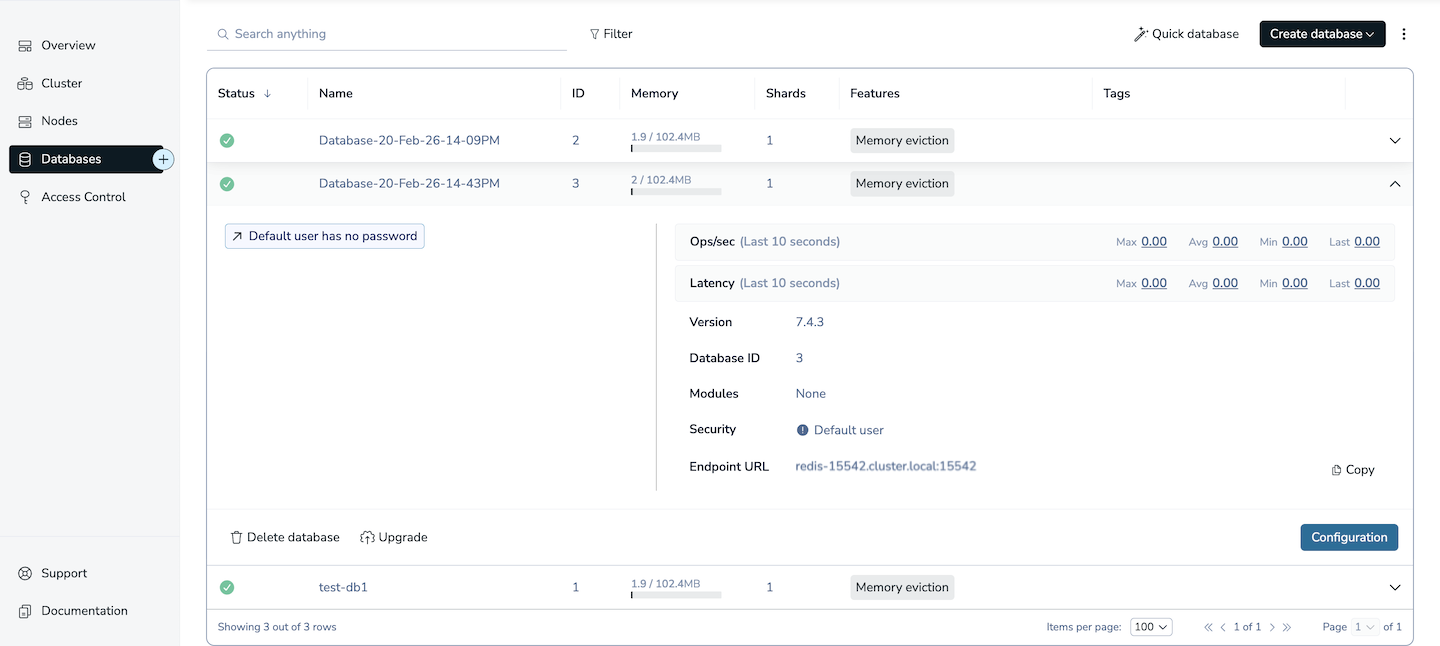\n\n 1. Click **Upgrade**.\n\n 1. For **Select version**, choose the Redis version for the database upgrade from the list.\n\n 1. Click **Upgrade**.\n\n 1. After the upgrade process finishes, check the expanded database details to verify that the Redis version is set to the expected value.\n\n To upgrade a database from its **Configuration** screen:\n\n 1. Select the database from the **Databases** list and go to its **Configuration** screen.\n\n 1. Click the **More actions** button (**⋮**).\n\n 1. Select **Upgrade version** from the list.\n\n 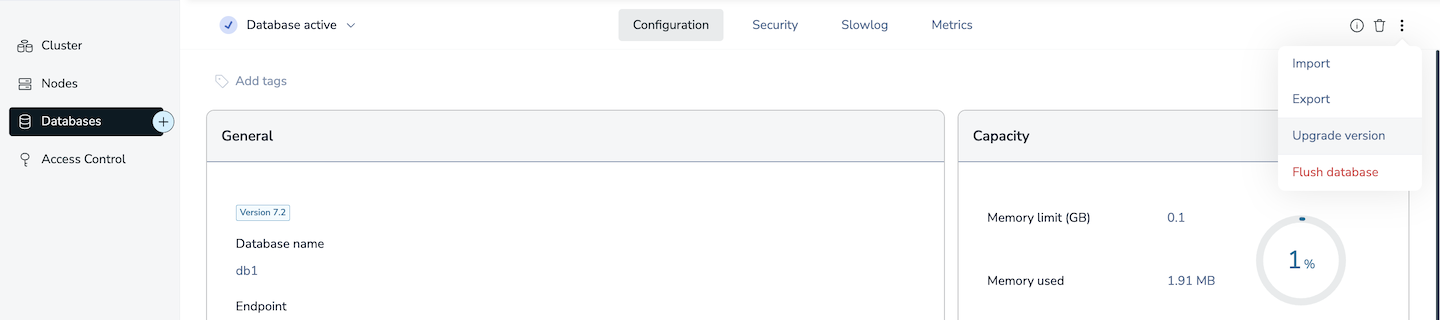\n\n 1. For **Select version**, choose the Redis version for the database upgrade from the list.\n\n 1. Click **Upgrade**.\n\n 1. After the upgrade process finishes, click the **About** button (ⓘ) and verify that the Redis version is set to the expected value.\n\n**rladmin:**\n\n1. Complete all [prerequisites](#upgrade-prerequisites) before starting the upgrade.\n\n1. Optionally, back up the database to minimize the risk of data loss.\n\n1. Upgrade the database using [`rladmin upgrade db`](https://redis.io/docs/latest/operate/rs/references/cli-utilities/rladmin/upgrade). During the upgrade process, the database will restart without losing any data. Use the `preserve_roles` option to keep the database's current state, including primary shard placement, and prevent the cluster from becoming unbalanced.\n\n To upgrade a database and its modules:\n\n [code example]\n\n Example of a successful upgrade:\n\n [code example]\n\n To upgrade the database to a version other than the default version, use the `redis_version` parameter:\n\n [code example]\n\n For module upgrade options, see [Upgrade modules](https://redis.io/docs/latest/operate/rs/installing-upgrading/modules/upgrade-module).\n\n1. Use [`rladmin status databases extra all`](https://redis.io/docs/latest/operate/rs/references/cli-utilities/rladmin/status#status-databases) to display a list of the databases in your cluster and their current Redis database compatibility version. Verify that the Redis version is set to the expected value.\n\n [code example]\n\n**REST API:**\n\n1. Complete all [prerequisites](#upgrade-prerequisites) before starting the upgrade.\n\n1. Optionally, back up the database to minimize the risk of data loss.\n\n1. Use an [upgrade database](https://redis.io/docs/latest/operate/rs/references/rest-api/requests/bdbs/upgrade) REST API request. During the upgrade process, the database will restart without losing any data. Use the `preserve_roles` option to keep the database's current state, including primary shard placement, and prevent the cluster from becoming unbalanced.\n\n [code example]\n\n For additional database upgrade options, see the [request body](https://redis.io/docs/latest/operate/rs/references/rest-api/requests/bdbs/upgrade#request-body) section of the database upgrade requests reference."
}
],
"examples": [
{
"id": "upgrade-prerequisites-ex0",
"language": "sh",
"code": "rladmin status extra all",
"section_id": "upgrade-prerequisites"
},
{
"id": "upgrade-database-ex0",
"language": "sh",
"code": "rladmin upgrade db preserve_roles",
"section_id": "upgrade-database"
},
{
"id": "upgrade-database-ex1",
"language": "sh",
"code": "rladmin> upgrade db demo\n Monitoring d194c4a3-631c-4726-b799-331b399fc85c\n active - SMUpgradeBDB init\n active - SMUpgradeBDB wait_for_version\n active - SMUpgradeBDB configure_shards\n completed - SMUpgradeBDB\n Done",
"section_id": "upgrade-database"
},
{
"id": "upgrade-database-ex2",
"language": "sh",
"code": "rladmin upgrade db redis_version preserve_roles",
"section_id": "upgrade-database"
},
{
"id": "upgrade-database-ex3",
"language": "sh",
"code": "rladmin status databases extra all",
"section_id": "upgrade-database"
},
{
"id": "upgrade-database-ex4",
"language": "sh",
"code": "POST https://:/v1/bdbs//upgrade\n {\n \"preserve_roles\": true,\n // Additional fields\n }",
"section_id": "upgrade-database"
}
]
}