{
"schema_version": 2,
"id": "operate/rs/security/access-control/create-cluster-roles",
"title": "Create roles with cluster access only",
"url": "https://redis.io/docs/latest/operate/rs/security/access-control/create-cluster-roles/",
"summary": "Create roles with cluster access only.",
"tags": [
"docs",
"operate",
"rs"
],
"last_updated": "2026-10-01T15:27:03+01:00",
"page_type": "content",
"content_hash": "3af45dcb23ce769928421ab46ad82106af499258802959fe211b1d12c093a381",
"sections": [
{
"id": "overview",
"title": "Overview",
"role": "overview",
"text": "Roles with cluster access allow access to the Cluster Management UI and REST API."
},
{
"id": "default-management-roles",
"title": "Default management roles",
"role": "content",
"text": "Redis Software includes five predefined roles that determine a user's level of access to the Cluster Manager UI and [REST API](https://redis.io/docs/latest/operate/rs/references/rest-api).\n\n1. **DB Viewer** - Read database settings\n1. **DB Member** - Administer databases\n1. **Cluster Viewer** - Read cluster settings\n1. **Cluster Member** - Administer the cluster\n1. **User Manager** - Administer users\n1. **Admin** - Full cluster access\n1. **None** - For data access only - cannot access the Cluster Manager UI or use the REST API\n\nFor more details about the privileges granted by each of these roles, see [Cluster Manager UI permissions](#cluster-manager-ui-permissions) or [REST API permissions](https://redis.io/docs/latest/operate/rs/references/rest-api/permissions)."
},
{
"id": "cluster-manager-ui-permissions",
"title": "Cluster Manager UI permissions",
"role": "content",
"text": "Here's a summary of the Cluster Manager UI actions permitted by each default management role:\n\n| Action | DB Viewer | DB Member | Cluster Viewer | Cluster Member | Admin | User Manager |\n|--------|:---------:|:---------:|:--------------:|:-----------:|:------:|:------:|\n| Create, edit, delete users and LDAP mappings | ❌ No | ❌ No | ❌ No | ❌ No | ✅ Yes | ✅ Yes |\n| Create support package | ❌ No | ✅ Yes | ❌ No | ✅ Yes | ✅ Yes | ❌ No |\n| Edit database configuration | ❌ No | ✅ Yes | ❌ No | ✅ Yes | ✅ Yes | ❌ No |\n| Reset slow log | ❌ No | ✅ Yes | ❌ No | ✅ Yes | ✅ Yes | ❌ No |\n| View cluster configuration | ❌ No | ❌ No | ✅ Yes | ✅ Yes | ✅ Yes | ✅ Yes |\n| View cluster logs | ❌ No | ✅ Yes | ✅ Yes | ✅ Yes | ✅ Yes
| ✅ Yes
|\n| View cluster metrics | ❌ No | ❌ No | ✅ Yes | ✅ Yes | ✅ Yes | ✅ Yes |\n| View database configuration | ✅ Yes | ✅ Yes | ✅ Yes | ✅ Yes | ✅ Yes | ✅ Yes |\n| View database metrics | ✅ Yes | ✅ Yes | ✅ Yes | ✅ Yes | ✅ Yes | ✅ Yes |\n| View node configuration | ❌ No | ❌ No | ✅ Yes | ✅ Yes | ✅ Yes | ✅ Yes |\n| View node metrics | ❌ No | ❌ No | ✅ Yes | ✅ Yes | ✅ Yes | ✅ Yes |\n| View Redis database password | ❌ No | ✅ Yes | ❌ No | ✅ Yes | ✅ Yes | ✅ Yes |\n| View slow log | ❌ No | ✅ Yes | ❌ No | ✅ Yes | ✅ Yes | ❌ No |\n| View and edit cluster settings | ❌ No | ❌ No | ❌ No | ❌ No | ✅ Yes | ❌ No |"
},
{
"id": "create-cluster-role",
"title": "Create roles for cluster access",
"role": "content",
"text": "You can use the [Cluster Manager UI](#create-roles-ui) or the [REST API](#define-roles-rest-api) to create a role that grants cluster access but does not grant access to any databases.\n\n**Cluster Manager UI:**\n\nTo create a role that grants cluster access using the Cluster Manager UI:\n\n1. From **Access Control** > **Roles**, you can:\n\n - Select a role from the list of existing roles to edit it.\n\n - Click **+ Add role** to create a new role.\n\n \n\n1. Enter a descriptive name for the role.\n\n1. Choose a **Management role** to determine cluster management permissions.\n\n 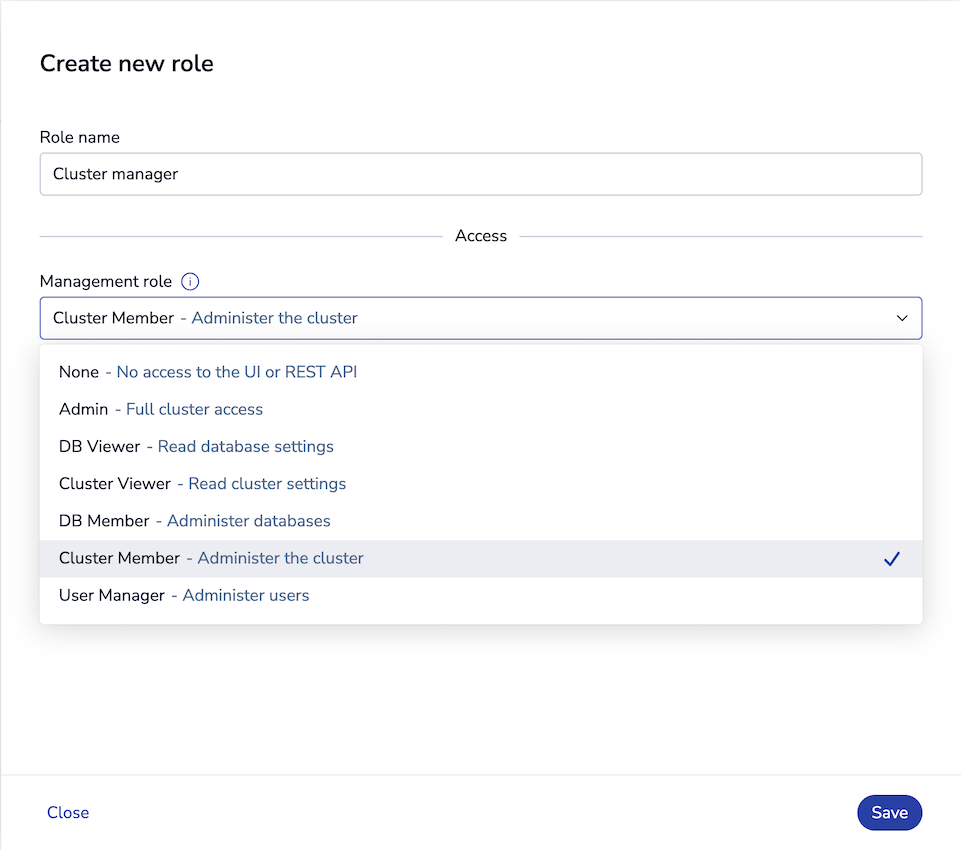\n \n1. To prevent database access when using this role, do not add any ACLs.\n\n1. Click **Save**.\n\n**REST API:**\n\nTo [create a role](https://redis.io/docs/latest/operate/rs/references/rest-api/requests/roles#post-role) that grants cluster access using the REST API:\n\n[code example]\n\n\n\nYou can [assign the new role to users](https://redis.io/docs/latest/operate/rs/security/access-control/create-users#assign-roles-to-users) to grant cluster access."
},
{
"id": "scope-a-role-to-specific-databases",
"title": "Scope a role to specific databases",
"role": "content",
"text": "By default, the `db_member` and `db_viewer` [management roles](#default-management-roles) grant access to every database in the cluster. In a shared or multi-tenant cluster, you can scope one of these roles to specific databases so that users assigned the role can view or manage only those databases.\n\nTo scope a role, add the `resources` field when you [create](https://redis.io/docs/latest/operate/rs/references/rest-api/requests/roles#post-role) or [update](https://redis.io/docs/latest/operate/rs/references/rest-api/requests/roles#put-role) a role with the REST API. The `resources` field is a list of resource scopes; each scope has a `type` (currently only `db`) and a `uids` array of the database IDs the role applies to.\n\nFor example, the following request creates a `db_member` role scoped to databases `1` and `2`:\n\n[code example]\n\nWhen you [assign this role to a user](https://redis.io/docs/latest/operate/rs/security/access-control/create-users#assign-roles-to-users):\n\n- The user can view or manage only the databases listed in the role's `resources` scope.\n\n- In the Cluster Manager UI and REST API responses, the user sees only their authorized databases, including in database lists, metrics, alerts, and event logs. Other databases are hidden.\n\nTo return a role to cluster-wide scope, update it with an empty `resources` list or omit the field. Roles without a `resources` scope apply to all databases, so existing roles are unaffected.\n\n> [!NOTE]\n> Database scoping applies to the `db_member` and `db_viewer` management roles."
}
],
"examples": [
{
"id": "create-cluster-role-ex0",
"language": "sh",
"code": "POST /v1/roles\n{ \n \"name\": \"\",\n \"management\": \"db_viewer | db_member | cluster_viewer | cluster_member | user_manager | admin\" \n}",
"section_id": "create-cluster-role"
},
{
"id": "scope-a-role-to-specific-databases-ex0",
"language": "sh",
"code": "POST /v1/roles\n{\n \"name\": \"team-a-dbs\",\n \"management\": \"db_member\",\n \"resources\": [\n { \"type\": \"db\", \"uids\": [\"1\", \"2\"] }\n ]\n}",
"section_id": "scope-a-role-to-specific-databases"
}
]
}