Understand CDC offsets and source retention
Learn why RDI can lose access to source change history during an interruption and how to plan for recovery.
Redis Data Integration (RDI) can resume after an interruption only if the source still provides the change history and capture state it needs. Saving a position does not preserve that history.
Imagine that RDI stops on Friday and starts again on Sunday. In this example, Oracle is the source database. Your application keeps writing to it during those two days. RDI remembers where it stopped, but Oracle has removed some of the redo logs needed to continue. The collector reports that its saved system change number (SCN) is no longer available.
The source tables still exist. RDI has not forgotten its position. What is missing is the history between that position and the present.
Two days is only an example. There is no universal expiration time for an RDI offset. The outcome depends on the database, its settings, the amount of change, and how far capture had already fallen behind.
Think of an offset as a bookmark
Change data capture (CDC) lets RDI follow changes instead of repeatedly reading the entire source dataset. Four concepts explain how it works:
- A snapshot reads the current dataset to establish a starting point.
- Change history records subsequent inserts, updates, and deletes. Depending on the database, this history lives in logs, change tables, or a change stream.
- An offset records the collector's progress through that history. Think of it as a bookmark, not a copy of the pages.
- Retention determines how long, or how much of, that history remains available.
The source continues maintaining its history while RDI is disconnected. If the required history remains available, RDI can read the missed changes. If the source removes it, the bookmark alone cannot reconstruct those changes.
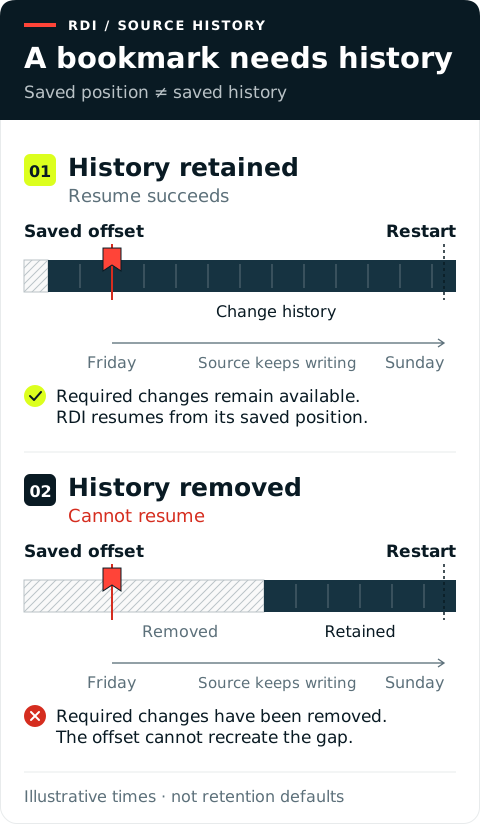
These timelines are illustrations, not database defaults. The important boundary is the oldest history still available when capture resumes.
RDI handles changes in two steps: the collector reads them from the source, then the processor transforms them and writes them to the target. This page focuses on the collector's bookmark. The processor separately tracks its progress so it can recover after a restart. See Checkpointing for that part of the pipeline.
See how each source keeps history
Each source has its own retention rules. These are source-database settings, not an RDI memory limit. A size limit usually means space on disk. The examples assume capture was working before the interruption.
Oracle: keep a complete, readable redo chain
Retention controls: cleanup rules and disk space. There is no single "keep CDC for this many hours" setting. Backup and cleanup jobs can remove archived logs based on their age or backup status. Oracle can also free disk space in its fast recovery area by removing logs that its deletion rules allow. Check both the archive deletion policy and any scheduled cleanup jobs.
Oracle records changes in redo logs. With LogMiner, RDI reads online and archived redo and tracks system change numbers (SCNs). An SCN does not expire as a number. The problem is whether Oracle can provide the history needed from that position.
Cleanup can remove an old archive, but a gap in the middle also matters. The file containing the saved SCN and the newest files can all exist while a required file between them is missing. With Oracle Real Application Clusters (RAC), mining needs the required redo from all relevant threads.
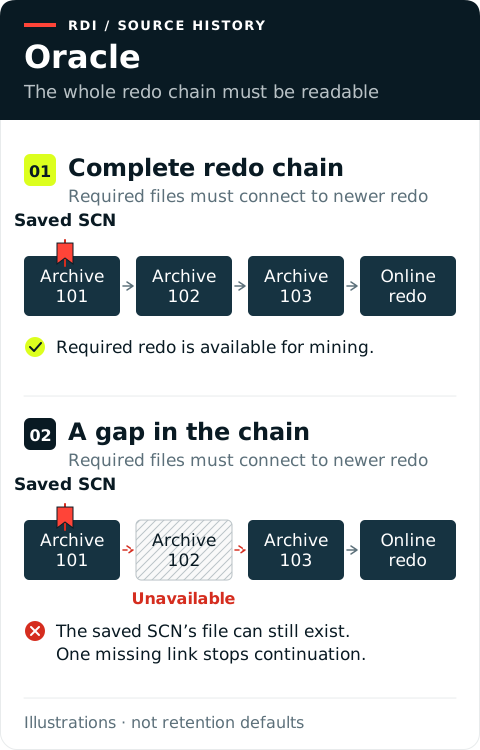
Unavailable does not always mean deleted. Archiving might be delayed, or the archive destination might be inaccessible. Check availability before choosing a fresh snapshot. See Oracle LogMiner requirements.
The logs also need matching table definitions. For example, an old change might refer to a column that has since been renamed or removed. LogMiner can fail to read that change if it uses today's table definition. Keeping more logs does not fix this. See the LogMiner strategy guidance.
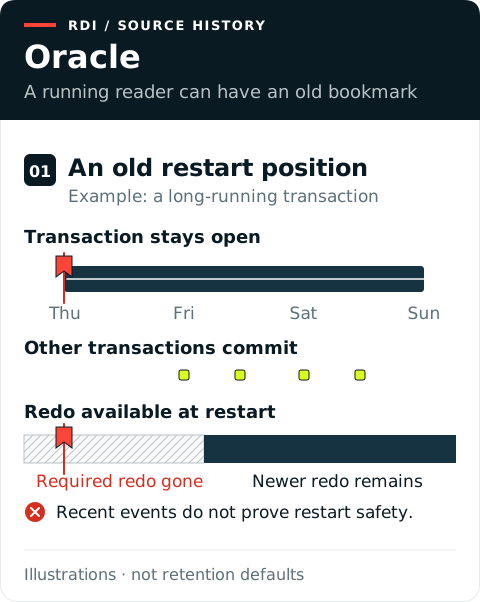
An outage is not the only risk. A long transaction can hold the restart position in older redo while other transactions continue. Quiet captured activity can also leave the saved offset behind. Monitor the saved position, not just recent events or process uptime. Use the connector's offset and heartbeat guidance for your Oracle configuration.
Two other cases need a different diagnosis. During a snapshot, a “snapshot too old” error concerns undo history for consistent reads, not streaming redo retention. With XStream, recovery also depends on Oracle's capture checkpoints and outbound-server state; a saved client position alone is insufficient. See Prepare Oracle and XStream restartability.
MySQL and MariaDB: preserve files and source continuity
Retention controls: an age limit, automatic cleanup, and manual or scheduled purges. MySQL and MariaDB can expire old log files. Cleanup can happen at server startup or when the binary log is flushed, including during rotation. It does not necessarily happen at the exact expiry time. In MySQL 8.0.29 and later, binlog_expire_logs_auto_purge can disable automatic cleanup even when an age limit is set. MariaDB 11.4 and later can also limit the total log size on disk. A limit on each individual file's size only controls rotation; it does not set the total retention window.
MySQL and MariaDB record changes in binary logs, often called binlogs. A bookmark can name a file and a position inside it. Rotating to a new file is normal. Older files must remain available until capture has read them.
Expiration or manual purging can remove required events. Resetting the binary logs can remove history immediately, regardless of the planned retention window. The source tables can remain intact throughout.
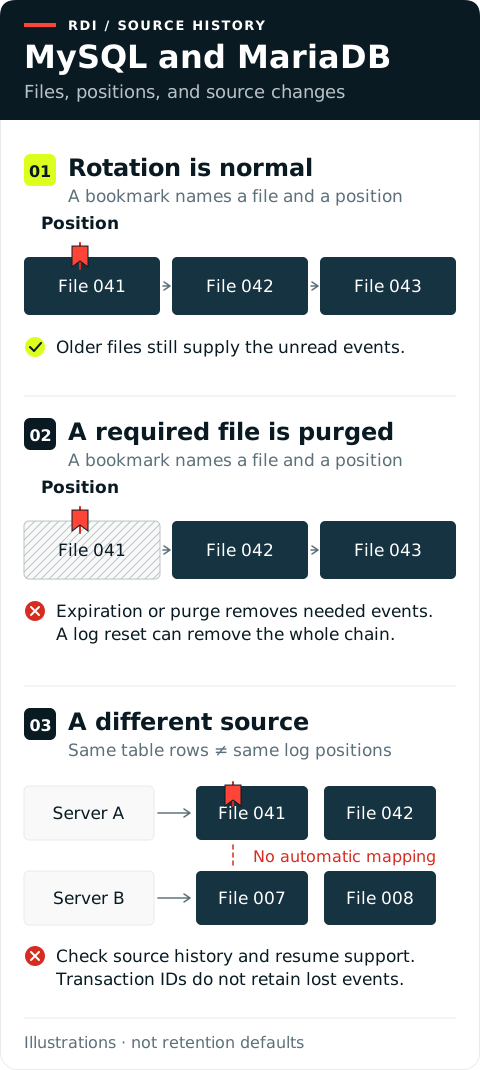
A source switch is a separate risk. File positions belong to a particular server's history. Global transaction identifiers (GTIDs) help identify transactions across servers; they do not recreate deleted events. Before a migration or failover, check that the replacement source has the required history and that your RDI configuration can resume from it.
Reading older changes also needs the right schema history: the record of how tables and columns changed. Rewinding across a column addition, rename, or removal can fail or produce wrong fields if that history does not match. Having the log files is not enough. See how the connector uses schema history.
Size retention and storage for peak writes. Coordinate purges and log resets with capture. See Prepare MySQL and MariaDB, MySQL purging, MySQL log resets, and MariaDB transaction positioning.
PostgreSQL: preserve WAL and slot state
Retention controls: slot progress, an optional disk-size limit, and an optional idle-time limit. A slot normally keeps the history its reader still needs, rather than keeping a fixed number of days. Size limits and idle timeouts depend on the PostgreSQL version. They take effect at database checkpoints, when PostgreSQL saves recovery state. See version-specific retention controls.
PostgreSQL records changes in its write-ahead log (WAL). RDI uses a logical replication slot and tracks a log sequence number (LSN). A valid slot can retain needed WAL while RDI is stopped. Disk usage can therefore grow throughout an outage. A full disk is a storage failure, not an expired LSN.
Two configured limits can break continuity differently. A finite slot size limit can allow required WAL to be removed at a checkpoint. PostgreSQL 18 can also invalidate an inactive slot at a checkpoint after an enabled idle timeout, even if WAL files remain. That timeout is disabled by default.
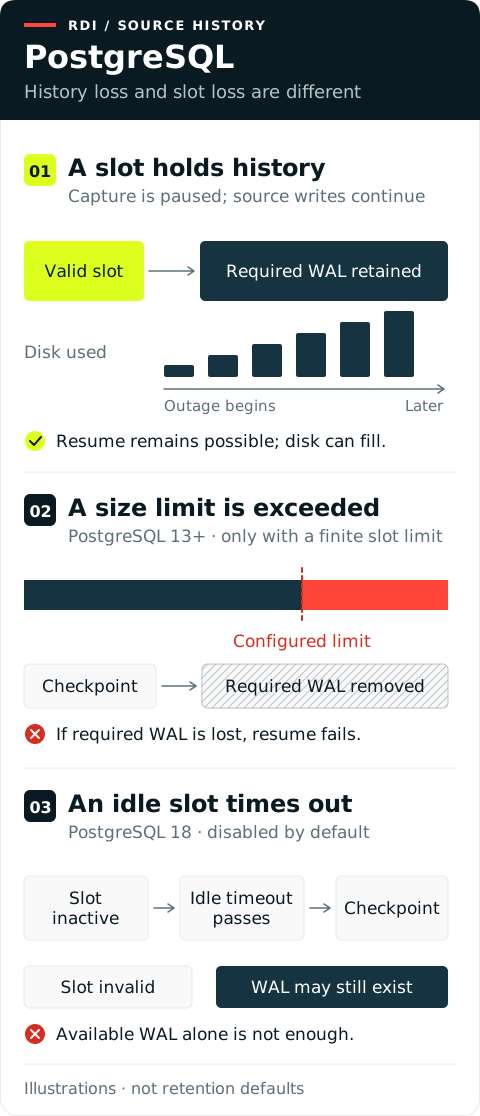
Keeping WAL is only part of recovery. Dropping and recreating a slot does not restore its old decoding state. After failover, the new primary needs usable slot state and the required history. A routine restart of the same database does not itself remove a persistent slot.
Resuming is also different from rewinding. The slot remembers which changes the collector has confirmed as received. Moving RDI's bookmark backward does not make that same slot send changes from before its confirmed position, even if the old WAL files still exist. See the slot's confirmed position.
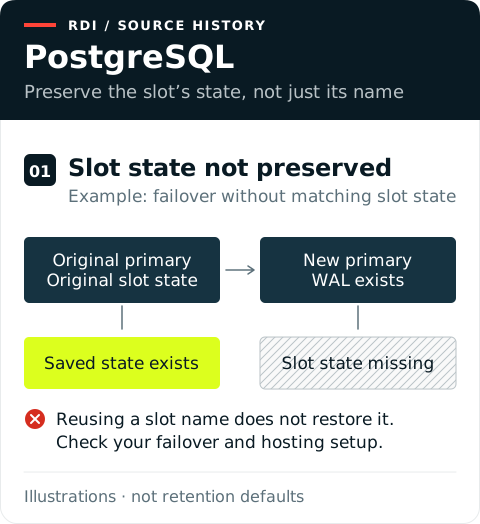
Monitor slot health, retained WAL, and free disk together. See Manage WAL retention for version-specific controls and PostgreSQL failover guidance for slot continuity. Supabase, Neon, AlloyDB, Amazon Aurora PostgreSQL, and other managed variants can have additional cleanup, storage, and failover policies. Do not assume they preserve every idle slot.
SQL Server: watch both capture stages
Retention controls: a time window and a scheduled cleanup job. The window is configured in minutes. The cleanup job removes old rows from the CDC change tables when it runs. This is not a memory-size limit; the tables also need enough disk space. See CDC cleanup jobs.
SQL Server first captures transaction-log changes into CDC change tables. RDI then reads those tables using an LSN-based position. If source capture stops, newer changes cannot reach RDI yet and the transaction log can grow. If RDI falls behind while capture continues, CDC cleanup can remove rows it still needs.
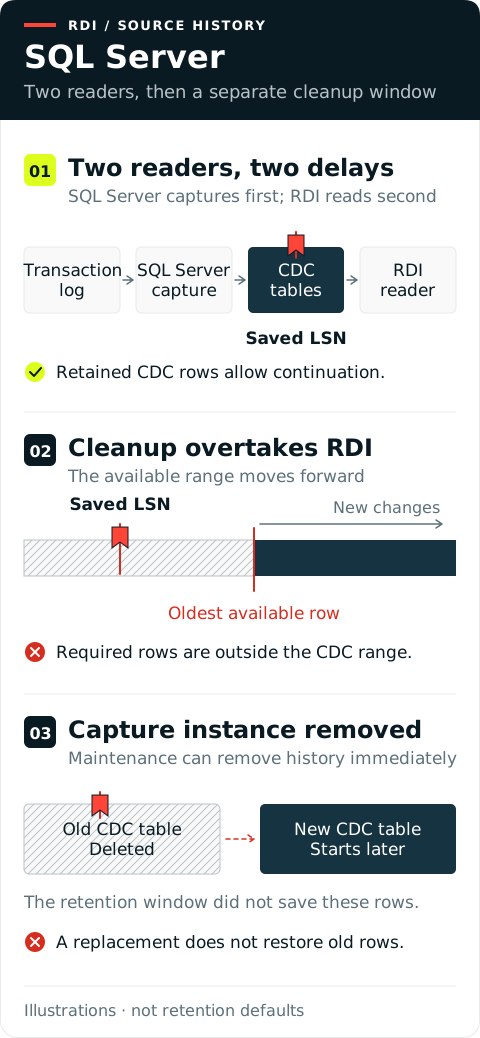
History can also disappear during maintenance. Disabling a capture instance deletes its change table, even inside the retention window. A new instance does not recreate those old rows. Follow the schema-change guidance before removing an old instance.
Monitor source capture and RDI reading separately. Keeping transaction-log backups alone does not make cleaned-up CDC rows available to this reader. See Microsoft's CDC administration and capture-instance removal references.
MongoDB: account for write volume and old values
Retention controls: log size, with an optional minimum time in hours. MongoDB normally removes the oldest entries automatically as its operation log fills. A minimum retention time can make the log grow beyond its configured size. It is a minimum age to preserve, not a deadline to delete. Check the oplog settings and your hosting service's limits.
MongoDB change streams provide a resume token. Resuming requires enough history in the replica set's operation log, or oplog. For a size-limited oplog, a busy day covers fewer hours than a quiet day. The same weekend interruption can therefore succeed once and fail after a large write burst.
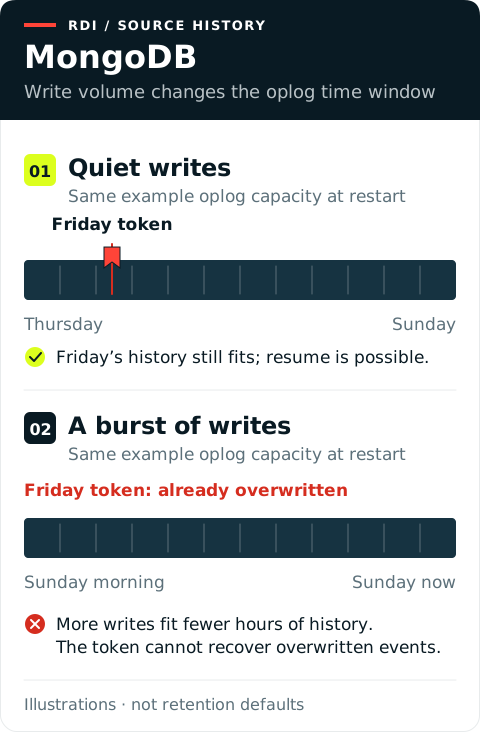
Some pipelines also need a document's old values, called a pre-image. Custom Redis keys can depend on fields that changed or were deleted. An event can remain in the oplog after its pre-image is gone. A usable resume token does not guarantee that all required old values remain.
Pre-images have separate cleanup rules: they can expire by age, or disappear when the matching event leaves the oplog. Background cleanup removes them.
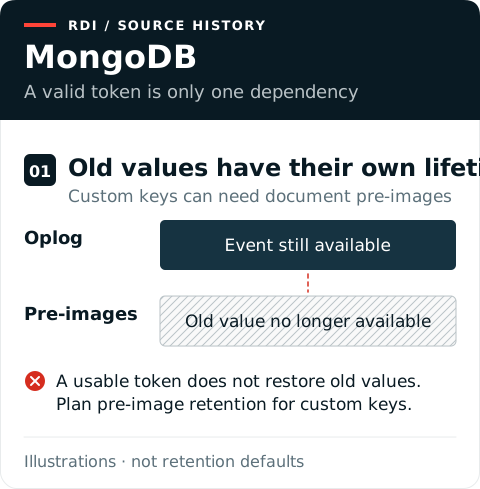
Reading an old event does not always return the document as it looked then. When the collector uses a full-document lookup, it gets the document's values at lookup time. For example, an older update can return Sunday's values instead of Friday's.
Monitor the actual oplog time window and any required pre-images. Dropping or renaming watched objects can also invalidate a stream, depending on its watch scope; this is separate from history expiry. See Prepare MongoDB and pre-image retention.
Spanner: distinguish two retention windows
Retention controls: two time windows, with automatic cleanup. You set how long to keep change-stream records and, separately, old database versions. These are durations, not memory or log-size limits. Spanner manages cleanup; you do not schedule a cleanup job. See change-stream retention and database version retention.
Spanner has two independent histories. Database version retention keeps older row versions for RDI's fixed-timestamp snapshot. A slow or interrupted snapshot can lose access to that timestamp. Change-stream retention keeps change records for streaming. Increasing one window does not extend the other.
Keep both retention durations in RDI's source configuration in sync with the database settings. RDI uses its configured durations for retention checks; changing only the database settings does not update RDI.
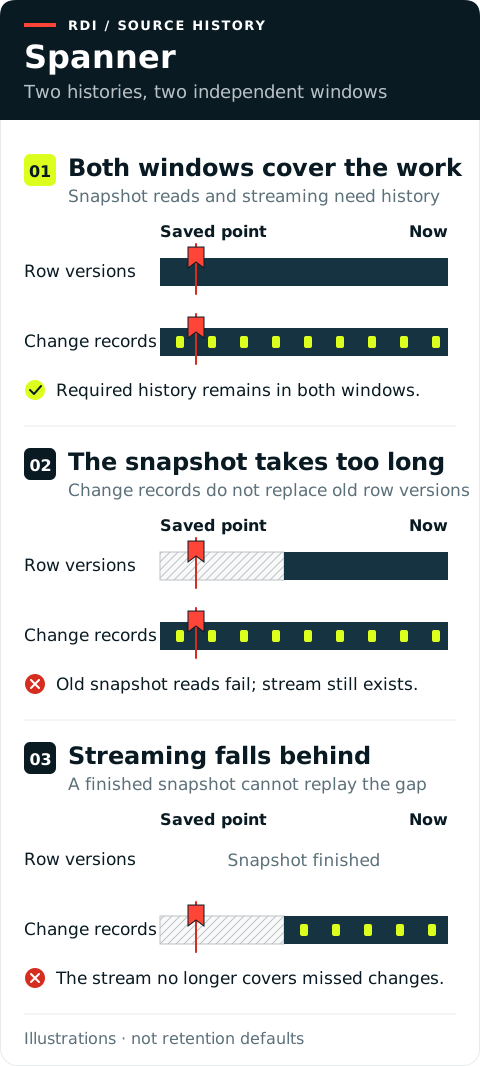
Changes to the stream can remove history before an outage ends. Reducing retention makes records outside the new window unavailable immediately. Dropping a stream deletes its records; recreating the same name does not restore them.
Also preserve what the stream watches. Suspending capture or excluding a required table or operation means those changes were never recorded. Longer retention cannot recover events that were never captured.
Plan version history for snapshot duration and change-stream history for lag, interruptions, and catch-up. See Prepare Spanner, timestamp limits, and change-stream management.
Snowflake: preserve table history and identity
Retention controls: time in days, with automatic management. On the source table, DATA_RETENTION_TIME_IN_DAYS sets how long Snowflake keeps old table versions through its Time Travel feature. MAX_DATA_EXTENSION_TIME_IN_DAYS limits how far Snowflake can extend retention to protect streams; its default is 14 days. Check both settings and any extension held by RDI's existing stream. Do not assume that every saved timestamp has 14 days of protection. These controls use storage, not a stream memory limit. See Snowflake retention rules.
RDI's bookmark is a saved table timestamp. When RDI resumes, it creates a stream at that timestamp to read the changes since then. It also recreates the stream when fetching later batches. If the required history is gone, creating the stream at the saved timestamp fails. Creating a new stream does not bring back old history.
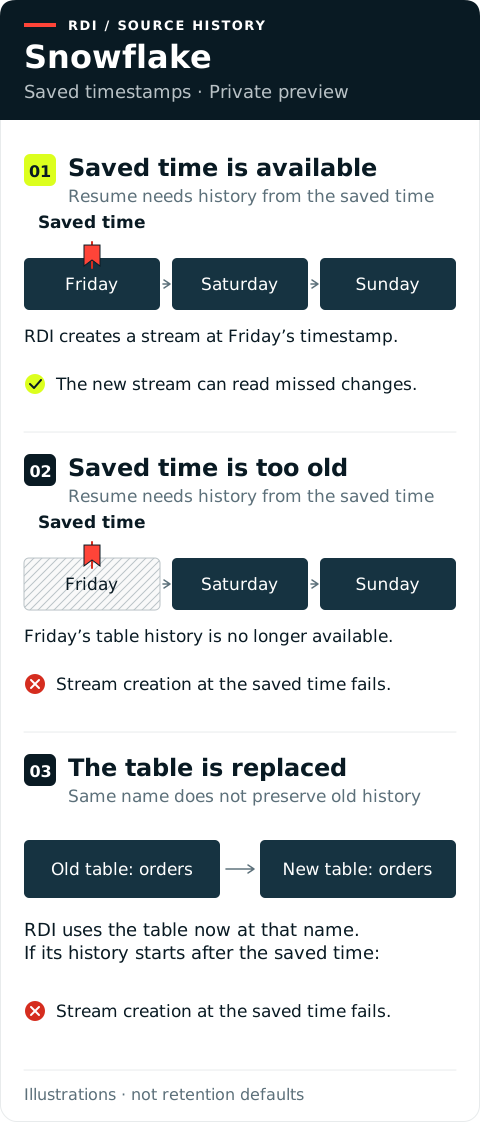
Replacing a table is another risk. RDI creates streams using the configured table name, which can now refer to the replacement. The name alone does not prove that the original history is still available. If the saved timestamp predates the replacement table's history, RDI cannot create the stream at that time.
Monitor how old RDI's saved timestamp is against the history still available for that table. The existing stream's STALE_AFTER value is a useful warning, but it does not prove that RDI can recreate a stream from its saved timestamp. RDI manages its streams; do not manually consume or replace them to clear an error.
RDI also checks whether streams have data. Snowflake can protect an empty stream from staleness when that check returns false. This does not protect pending changes during a collector outage.
Snowflake support is in private preview. See Prepare Snowflake, creating a stream at a past timestamp, and empty-stream checks.
Plan for the whole interruption
RDI does not have to be completely down for history to become unavailable. A network failure, lost source access, or sustained capture lag can leave its position behind. A slow target can build a backlog until backpressure stops capture. Source cleanup continues independently.
Use a conservative planning budget:
Existing capture lag + longest expected interruption + catch-up allowance + safety margin.
This is a planning aid, not a universal database setting. For example, a 48-hour outage budget needs more than 48 hours of retained history if capture was already behind. Catch-up also needs spare processing capacity while the application continues writing.
Before maintenance, check capture progress, available history, and storage. After restoring or replacing a source, also verify that the saved offset still belongs to its history and capture state. For size-based limits, estimate how much history peak writes produce, not just average writes. Where history is retained by a slot, check how much additional disk an outage could consume.
Alert while there is still time to act. Combine RDI monitoring with source-database checks. A running process or a saved offset does not prove that capture is advancing or that its history remains available. Confirm managed-service limits and cleanup policies with the database owner.
Recover when the history is gone
First identify whether required history is missing or temporarily inaccessible. A permissions or archive-access problem needs a different correction from deleted history.
If the database can make the original history available again through a supported procedure, resuming may still be possible. Otherwise, rebuilding from a fresh snapshot establishes a new starting point. Increasing retention protects future history; it cannot recreate removed records.
Changing an offset does not bring back missing history either. An offset can record both a log position and progress within a group of changes. Editing only part of it can skip or repeat changes. Rewinding can send events again; moving forward skips events. Restoring an old offset does not undo changes already written to Redis.
A schema-history rebuild is different from a data snapshot. It reads current table definitions, not the rows. It cannot recreate older definitions needed to read old changes, or repair data already written with wrong fields. See the connector's schema-recovery restrictions.
A snapshot reads what exists now. It does not recover every intermediate event. Consider a row that existed in Redis on Friday but was deleted from the source on Saturday: Sunday's snapshot contains no row to overwrite that old Redis key. Recovery must account for such stale target data as well as current source rows.
Use the pipeline reset guidance with your source's snapshot configuration and a plan to remove stale target data. Do not move an offset forward just to silence an error. Verify actual field values, inserts, updates, and deletes before relying on the target again; matching row counts alone is not enough.